Marthe Moengen

Gal in a Cube

When should you use Power BI Dataflows vs Power BI Datamarts? — 13. Dec 2022

When should you use Power BI Dataflows vs Power BI Datamarts?


I have previously written articles on the What, How, When and Why of Power BI Datamarts and Power BI Dataflows. Have a look below if you want to get a quick overview of the two features of Power BI Service.

But when should you use what?

Power BI Dataflows vs Power BI Datamarts

Let’s revisit the When of both Power BI Dataflows and Power BI Datamarts!
Use casePower BI DataflowPower BI Datamart


Tables that are reused throughout your organization
Dataflows are particularly great if you are dealing with tables that you know will be reused in your organization, e.g. dimension tables, master data tables or reference tables.You can also reuse a datamart, but it is unnecessary to build a datamart to solve this use case.


Azure Machine Learning and Azure Cognitive Services
If you want to take advantage of Azure Machine Learning and Azure Cognitive Services in Power BI this is available to you through Power BI Dataflows. Power BI Dataflows integrates with these services and offers an easy self-service drag-and-drop solution for non-technical users. You do not need an Azure subscription to use this but it requires a Premium license. Read more about ML and Cognitive Services in Power BI Dataflows here.When looking through Power BI Datamarts today I cannot see this functionality easily available. Dataflows was however designed to solve this use case and is, in my opinion, a good place to start.


Incremental refresh
Power BI Dataflows provides the possibility to incrementally refresh your data based on parameters to specify a date range. This is great if you are working with large datasets that are consuming all your memory. However, you need a premium licence to use this feature.It is also possible to set up incremental refreshes for your separate tables in your Datamart. If you have a couple of large tables within your datamart, this could be a nice feature to take advantage of.


Ad-hoc SQL querying and data exploration
You can explore your data through a dataflow, but it is not possible to run SQL queries with dataflows.Datamarts are particularly great if you want to do ad-hoc querying or data exploration of your data as sort, filter, and do simple aggregation visually or through expressions defined in SQL
This image has an empty alt attribute; its file name is image-17.png

Self Service Data modelling
Dataflows do not support setting up relationships between tables, building measures or writing DAX. A great thing with Power BI Datamarts is that you can model your star schema right in Power BI Service. That way you do not have to wait for the data warehouse to make smaller (or larger) improvements or changes to your data model as you can do these changes yourself – but remember that permanent transformations should be moved as close to the source as possible. This also enables Mac users to do some modelling in Power BI Service.


Need to connect to your data in Power BI Service through a SQL endpoint.
Not possible with dataflows.Power BI datamarts provide a SQL end-point to your data. This is great if that is a requirement from developers or data analysts. You can then use database tools as SSMS to connect to your datamart as any other DB, and run queries.

Let me know what you think and if you have other use cases where the tools should be compared.

Useful links:

What, How, When and Why on Power BI Datamarts [Hill Sprint] — 8. Nov 2022

What, How, When and Why on Power BI Datamarts [Hill Sprint]

The What, How, When and Why on Power BI Datamarts!

  1. What are Power BI Datamarts
  2. How can you set up Power BI Datamarts?
  3. When should you use Power BI Datamarts?
  4. Why should you use Power BI Datamarts?

What are Power BI Datamarts

Power BI Datamarts are a self-service analytics solution that provide a fully managed database that enables you to store and explore your data in a relational and fully managed Azure SQL DB.

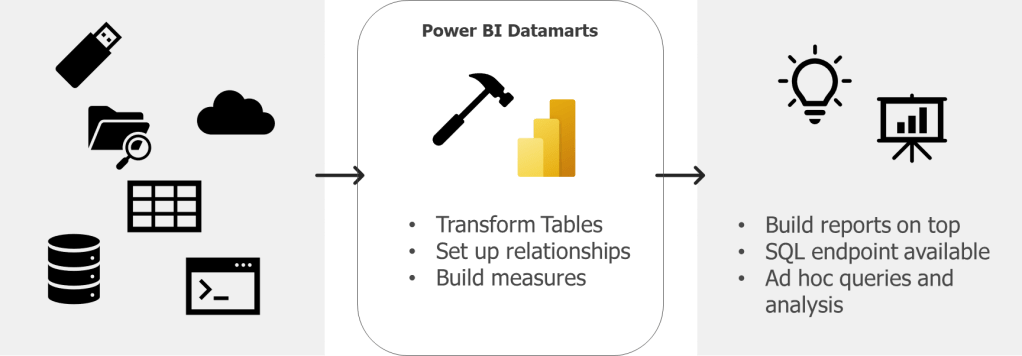
That means that you can connect your sources, transform these, set up relationships between the tables and build measures – resulting in a data model in Azure SQL database that you can connect to as any other database.

Datamarts are not a new thing though. A datamart in the world of a data warehouse is the access layer containing a focused version of the data warehouse for a specific department that enables analytics and insights to the business. A datamart could be a star schema designed to provide specific KPIs.

Hence, in Power BI Datamarts we can now build this access layer for specific business domains in Power BI Service as a star schema with relationships and measures.

If you want to learn more on Power BI Datamarts, you can read the documentation from Microsoft here.

How can you set up Power BI Datamarts?

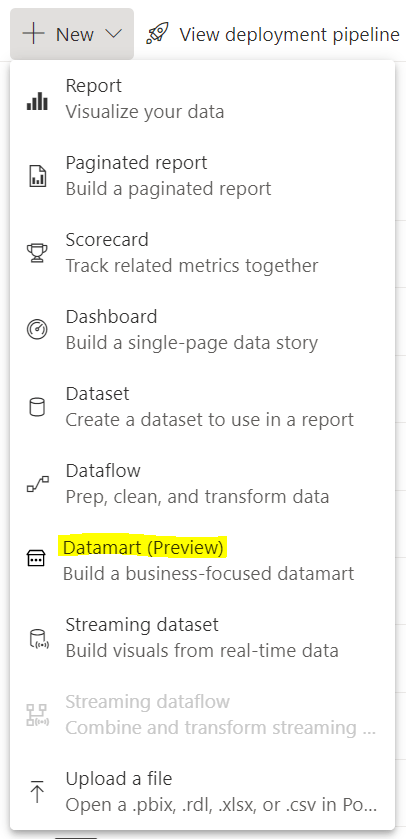
You set up a Power BI Datamarts in Power BI Service. This is done through the workspace you want to hold the datamarts and by clicking “New”.

You then do the following:

  1. Choose source type and connect to your source
  2. Load the data source and transform this (if you want to) in Power Query
  3. Then the data source is loaded into a datamart. You can now do the following based on what you want and need to do to your data:
    • Set up relationships
    • Build measures
    • Run queries with SQL
    • Run queries using low-code functionality

You need premium capacity or premium per user to get access to Datamarts.

When should you use Power BI Datamarts?

Datamarts are particularly great if you want to do ad-hoc querying or data exploration of your data as sort, filter, and do simple aggregation visually or through expressions defined in SQL

A great thing with Power BI Datamarts is that you can model your star schema right in Power BI Service. That way you do not have to wait for the data warehouse to make smaller (or larger) improvements or changes to your datamodel as you can do these changes yourself. If these changes should be permanent or a in between solution while one wait for the datawarehouse depends on the governance that is set up.

In addition, Power BI datamarts provide a SQL end point to your data. This is great if that is a requirement from developers or data analysts. You can then use database tools as SSMS to connect to your datamart as any other DB, and run queries.

Why should you use Power BI Datamarts?

Power BI Datamartscan help us solve a range of challenges with self-service BI. Many of these are similar gains as one could get from Power BI Dataflows.

  • Improved access control as you can provide data analysts with access to the datamart instead of direct access to the data source
  • One source of truth for business logic and definitions
  • Provides a tool for standardization on the ETL process
  • Enables self-service BI for non-technical users
  • Enables reusability

Specific worth from datamarts (compared to Power BI dataflows) are:

  • Self-service solution for quering and explore data for data analysts, as well as for non-technical users as you can query the datamart using low-code functionality
  • Reduce time to production if the alternative is to wait for the needed changes or development to be delivered through the data warehouse. Also, Datamarts developers do not need code experience, and can ingest, transform and prepare the models using existing knowledge from Power Query and Power BI Desktop.
  • Power BI Datamarts support row-level-security (where Power BI Dataflows do not)

Useful links:

What are Hill Sprints?

I am having a series called hill sprints (since we are climbing mountains – hehe) that will provide a to the point introduction on a topic covering the What, How, When and Why.

Why hill sprints?

Hill sprints are essentially a form of interval training – probably one of the more intense (but engaging) options. They are quick, brutal and to the point. Let me know if you have another fun analogy towards climbing mountains that would make sense for a series name! (Having way to much fun with this)

First Hill Sprint Series will be on Power BI Service. In this series we will go through some of the main components in Power BI Service, explaining what is it, how can you set it up, when should you use it, and why should you use it.

Hopefully, this can provide some quick insights and knowledge on the components and help decide if this is the tool for you with your current setup or challenge.