Marthe Moengen

Gal in a Cube

WITs who Lunch — 11. Apr 2023

WITs who Lunch

Yes – finally putting this idea to life!

I will just jump right to the point – I think we need more places where we as Women in Technology can meet. That is low-key. Where we actually get the time and place to talk. Inspire each other. Learn from each other. Mentor each other.

So, I want to try and create that space. With a semi-regular meetup IRL in Oslo – and now also online for some hybrid events!

Who can join?

  • You identify as a woman
  • You are working in tech
  • You are close enough to Oslo to join a lunch once a month
  • You are looking for other awesome techies that you can have great discussions with, learn from and motivate!

Why am I doing this?

I am lucky enough to be on the organizing committee of Microsoft Data Platform User Group Norway and Data Saturday Oslo. Here I see that there are more male speakers and attendees than female. Why is that?

  • Anyone who works closely with me knows that I always nag about speaking opportunities and meetups. Still, I don’t see the changes I want happening as fast as I want them to. Is it because I am not reaching broad enough? Hopefully, this is a way to reach more of you and inspire you to join the data community.
  • I get a lot of my technical input from social media as LinkedIn and Twitter. This is also where I often discover events, meetups and opportunities to present and meet other techies. So what if I did not follow the “right people” on these social media? Would I not get all these opportunities then? Let’s, therefore, connect so we can give each other tips on tech updates and events to attend!
  • I see that there are more male attendees than females at meetups and conferences. I wonder if that might be because we are missing someone to attend with. I rarely see multiple females attending together. I, therefore, hope this group will connect us so we can attend together!
  • Also, I see that men in general are great at letting each other know that they are performing well. They are so good at saying “You are doing a great job, Buddy”. Loud. At the coffee station. Or in the comments on social media. Let’s build a group where we can do more of this! I think we as Norwegian females got something to learn from our male colleagues here. Let’s try and be a bit louder in general, and also when we cheer each other on.
  • Let’s be each other’s Kitchen cabinet! I got this advice from a WIT lunch at PASS in 2022, and I love it. “Kitchen cabinet” refers to any group of trusted friends and associates, particularly in reference to a president’s or presidential candidate’s closest unofficial advisers (Wikipedia). I am hoping this could be an arena to build kitchen cabinets of trusted advisors that can give advice, help and support when needed. Hopefully, it will help you keep on going, and gain confidence and strength when needed.
  • And, I want to give a shout-out to Deborah Melkin and her blog A Woman in SQL 2023 where she digs into the numbers and basically says We need to be doing more. Reading that blog post was the last nudge I needed to – just do this! Thank you!

How can you join?

Easy. Just sign up to our Meetup Group: https://www.meetup.com/wits-who-lunch/

Please notice that your email will be collected so that I can send out a calendar invite for the lunch.

And nothing is sponsored. This is just me, inviting you to lunch or dinner or after work hangouts. Please be prepared to pay for what you want to eat and/or drink.

How can you contribute if you are not a WIT close to Oslo?

If you are working for a company that could sponsor the coffee for this group – please contact me!

If you are a woman that has already made it (you are a leader and/or an acknowledge technical expert) and want to contribute to this group – please contact me!

If you are missing this type of arena, but not living close to Oslo – please contact me. We might be able to work something out – and you are ALWAYS welcome to join the hybrid events online.

If you are non of these things – but still want to contribute – please share this blog post with females you think might want to join. My biggest challenge now will be to have this message reach the ones in need of it!

What will this be?

Good question.

I don’t know! It will be what we want it to be. Maybe just a low-key meeting arena. Maybe we will have some sessions where we present on a topic and learn from each other. Maybe we will connect, become friends, and then the need for this group will no longer be there – at least for a while. Or maybe this will be the new WITs only Norwegian Order of Freemasons.

It is up to us!

Power BI Pro or Power BI Premium – what license should you choose? — 15. Feb 2023

Power BI Pro or Power BI Premium – what license should you choose?

So, what should you choose when looking at the different licences in Power BI? Do you really need to pay for Premium? Or is Premium in fact cheaper for your organization? What features could you take advantage of for the different licenses? And what considerations should you take when evaluating this?

Let’s have a look!

  1. What Power BI licenses are available?
    1. Free
    2. Power BI Pro
    3. Power BI Premium per User
    4. Power BI Premium per Capacity
  2. What should you consider when deciding on a Power BI license?
    1. What flexibility do we need when it comes to changing the licence in the future?
    2. Do you have any technical deal-breaker requirements?
  3. So, what should you choose?

What Power BI licenses are available?

There are four Power BI licenses to choose from. Free, Pro, Premium per Capacity (PPC) or Premium Per User (PPU).

Ordinary Workspace/AppWorkspace/App PPUWorkspace/App PPC
Free licenseNot able to accessNot able to accessGot access
Pro licenseGot accessNot able to accessGot access
PPU licenceGot accessGot accessGot access
Premium per Capacity vs Premium per User

Free

Without a license (or with the free license), you can still take advantage of Power BI Desktop. Still, you cannot share your content with others. The free license is a great place to start learning Power BI if you are curious, but not in a position to purchase a license.

If you are a report consumer and the content you want to consume is placed in a workspace connected to a Premium per Capacity, you do not need any other license than the free one.

Power BI Pro

With a Pro license, you get full developer functionality (with some exceptions that are listed in the next chapter). You can share your content with others.

If you are a report consumer, and you want to consume reports that are inside a workspace that is NOT linked to a premium per capacity license, you also need a Pro license to consume that content.

Power BI Premium per User

With a Premium per User (PPU) license you get full functionality as a developer. Essentially, you get all the Premium features on a per-user basis. You do not need an additional Pro license if you have a PPU license, as all Pro license capabilities are included.

However, if you are a report consumer you also need a Premium Per User license to be able to consume the content within a workspace that is linked to a Premium Per User license.

Power BI Premium per Capacity

With a Premium per Capacity (PPC) license you get full premium functionality. Still, as a report developer, you need a Pro or PPU license to share your reports.

If you are a report consumer, you only need the Free license to consume content that is linked to a Premium per Capacity license.

What do you get with the different licenses?

So, what are the differences between the Pro, Premium per User and Premium per Capacity licenses?

Microsoft got a great overview page where you can compare the licenses and their features HERE.

Below I have listed the differences that in my experience are the most important when considering what license to choose.

PROPremium (Per user)
$ 9.99 monthly price per user$ 4.995 monthly price per dedicated cloud computing and storage resource with an annual subscription.
($ 20 per month per user)
1 GB model size limit.
Your .pbix file cannot be larger than 1 GB
400 GB model size limit
(100 GB model size limit)
8 daily refreshes on dataset in Power BI Service48 daily refreshes on dataset in Power BI Service
Deployment Pipelines available (Application lifecycle management)
Read more on deployment pipelines in my article
Dataflows (minus the dataflow premium features)Dataflows premium features:
– The enhanced compute engine (running on Power BI Premium capacity / parallel execution of transforms)
– DirectQuery connection to dataflow
– AI capabilities in Power BI
– Linked entities
– Computed entities (in-storage transformations using M)
– Incremental refresh
Read more on dataflows in my article
Datamarts available
Read more on datamarts in my article
Embed Power BI visuals into apps
Advanced AI (text analytics, image detection, automated machine learning)
XMLA endpoint read/write connectivity
Configure Multi-Geo support (Only PPC)

What should you consider when deciding on a Power BI license?

Choosing what license fits best for your organization is not easy, and depends on individual requirements. Still, let’s see if there are any questions and considerations you could take into account when trying to decide what license you need.

What flexibility do we need when it comes to changing the licence in the future?

Deciding between the licences can for sure be a difficult decision. The great thing is that you do not have to choose and stick to that solution forever. Many start out with a Pro license, and then as the Power BI usage and adoption within the organization grows, they move over to Premium.

It is however a bit harder to move back to a Pro license if you have started developing reports and datasets that exceed the size limit or have started to take advantage of deployment pipelines, datamarts or premium features in dataflows.
Another important aspect is that you commit to the Premium per Capacity for a year, even though it is billed monthly. This also makes it difficult to move back to Pro.

Still, if you have started taking advantage of these premium features, you probably see the value of keeping the premium capacity.

How many report consumers do you have?

Price wise there is a sweet spot to evaluate here. When you have a premium capacity, you connect your workspaces to that premium capacity. That means that all the reports you publish to an app from that workspace are visible to anyone. They do not need their own pro licence to be able to consume the reports you put in these premium workspaces/apps.

So, some quick math gives us a number of report consumers where the premium feature pays off.

500 report consumers. If you know that you have that many report consumers today or expect to reach that number soon as your company grows and the adoption of Power BI increases, the Premium per Capacity license is a good choice.

Are you using Power BI on an enterprise level?

Or how large is Power BI in your organization? Are there multiple workspaces, apps, reports, data domains and business areas?

How complex is your report development process? Are your report development teams organized in different business domains, but still collaborate on content?

Do you see the need to take advantage of Deployment pipelines to improve the lifecycle management of your content, or do you want to implement source control using an XMLA endpoint?

If you are considering starting with Power BI and know that your setup requires some level of complexity, these premium features can really help you out with large enterprise deployments and workloads.

How large are your reports?

First of all – try and reduce the size of your report. Microsoft got an article listing the techniques you could consider:

Now, if you are not able to reduce the size of your reports below 1 GB, or that does not make any sense to you, the Premium per Capacity or Premium per User license sounds like a solution for you.

Do you have any technical deal-breaker requirements?

When evaluating this question you should collect the technical requirements for your organization. Based on that list, you might see some deal-breakers when it comes to choosing the Pro license.

For instance, you might need an SQL endpoint for your datamarts, or an XMLA endpoint to automate deployment that requires premium features.

You might have some data residency requirements that can only be achieved through a Premium Per Capacity license.

You will be working with datasets that are above 1 GB.

Or you want to take advantage of an incremental refresh for real-time data using DirectQuery. This is only supported for premium licenses.

Getting an overview of these requirements, and evaluating if they require Premium features is a good starting point.

Do you need some of that additional premium features, but the premium per capacity is too much?

After having evaluated all of these questions above, you might still be in need of some of the premium features but are not in a position to choose Premium per Capacity as that might be too expensive. Then Premium per User could be the solution for you if you:

  • Want some of your Power BI Developers to learn or investigate the premium features?
  • Take advantage of the advanced AI features?
  • Want to take advantage of the Deployment Pipelines to improve the lifecycle management of your content?
  • Are working with large datasets that you cannot reduce the size of?
  • Want to set up a solution for source control taking advantage of the XMLA endpoint? Read my article on source control and your options HERE.
  • Want to centralize your BI solution in Power BI Service by building re-usable dataflows and datamarts, and reducing some of the development load on your data warehouse?
  • Do not have a proper data warehouse solution in your organization and want to take advantage of the datamart feature in Power BI Service?

Still, remember: If you go with a PPU license, all consumers of that conent also need a PPU license.

So, what should you choose?

The considerations listed above are probably not covering everything you need to consider if you are in a position where you need to decide between licenses, I am sure.

Still, they might give you a starting point in your evaluation.

The decision each organization falls on depends on the requirement that exists within the individual organization.

Let’s try to sum up some key take aways:

  • If you do not see the need for the premium features to start with –> Consider starting with Pro licenses
  • If you have more than 500 report consumers –> Consider Premium Per Capacity
  • If you are a smaller organization, but still need the premium features –> Consider Premium Per User
  • If you are using Power BI in a large organization across business areas, with numerous reports and datasets and development teams –> Consider Premium Per Capacity
  • Have a look at your technical requirements. –> Some of the limitations with the Pro licenses might make a premium choice obvious for your organization.

One thing that’s also worth mentioning is that Power BI for sure focus its investment on Power BI Premium. The value provided by Power BI Premium will therefore probably increase over time.

So, what license should you choose?
The short answer: It depends.

Useful links:

Thank you to all that contribute to improve this article!

Source Control in Power BI – What are your options? — 1. Feb 2023

Source Control in Power BI – What are your options?

Updated 21.06: With the realease of Microsoft Fabric, built in Git integration is now a part of your workspace solution inside Fabric (!). More information here: https://learn.microsoft.com/en-us/fabric/cicd/git-integration/intro-to-git-integration

The rest of this article refers to the possibilities before this built in Git feature was released.

So version control in Power BI has been a challenge from the start. What do you do if the changes you made messed everything up and you want to roll back to an older version? Or if the file you saved on your computer is (unintentionally) deleted? What if parts of the changes you made where really good and you would like to update other reports with the same changes? Then what?

No built-in solution for this exists in Power BI today. If you have a Premium licence, deployment pipelines are an option. The Deployment Pipelines will help you get better control of your data, and provide an overview of the differences between the content in workspaces. However, it is not solving all the challenges we have mentioned above. I have written an article about that feature here:

We are still missing source control! This is a feature many wished for from the Power BI team. The idea has been voted on at ideas.powerbi.com. In March 2022 an administrator updated the idea to: We are working on this item but no timeline can be shared yet. We appreciate your patience

So, while we wait for this new feature to come, let’s take a look at your options!

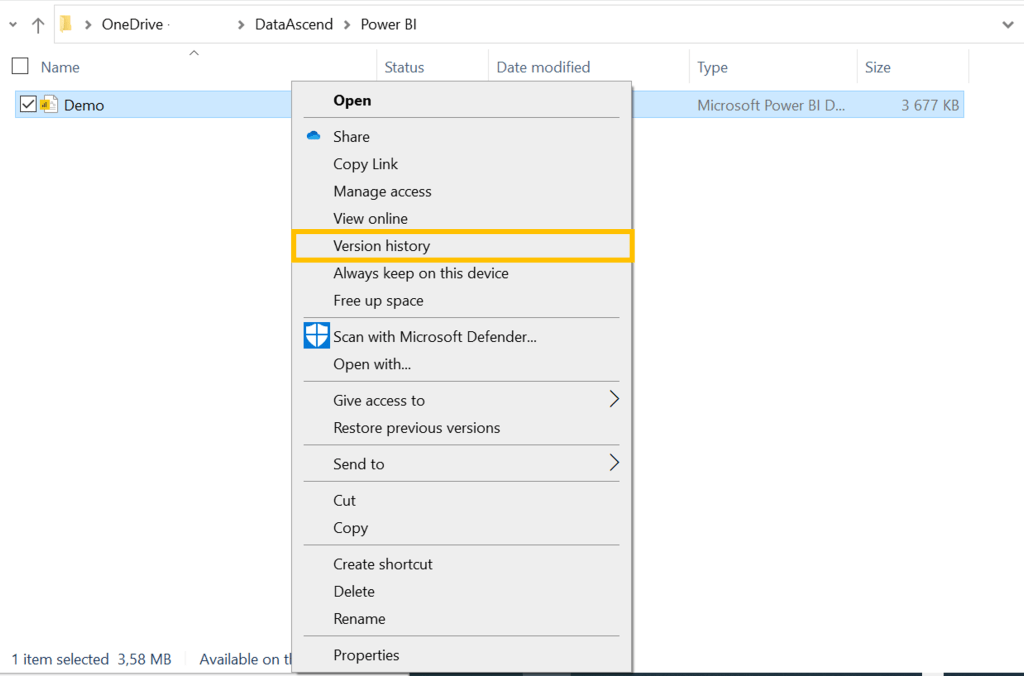
Version control your .pbix files using OneDrive or Sharepoint

The .pbix file is a binary file. That means that it is not possible to track changes. So, what can we do?

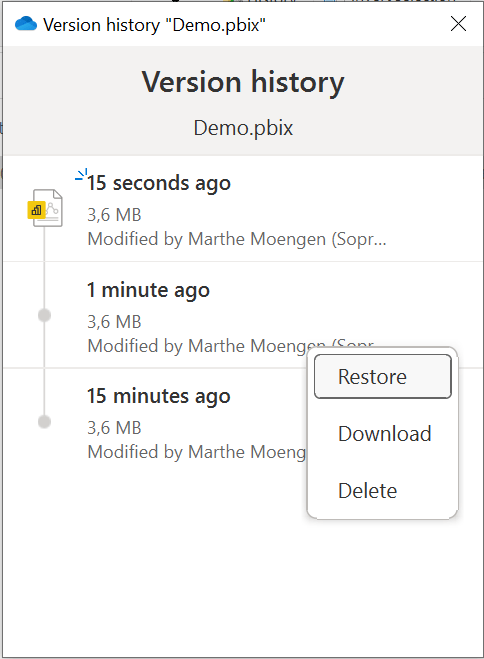
OneDrive and Sharepoint contain built in solution for version control witch means that you can get access to a previous versions.

Pros:

  • Easy to start using!

Cons:

  • You have to make all changes in Power BI Desktop in order to get the version history. This means that you are losing some flexibility of Power BI Service.
  • As you are working with the binary file you cannot:
    • Do diffs or schema compares of the versions
    • Cannot merge the files or have multiple developers working at the same time

Considerations:

  • Make sure that there is a process in place so that all developers that collaborate on the same reports use the same OneDrive/Sharepoint folder.

Version control your .pbix files using Git

You could also use GitHub or Azure DevOps to store your file and track the version of your .pbix file by committing the file to git after making changes as you would with other files in Git.

Pros:

  • Could be incorporated into existing development process using git

Cons:

  • Same as for using OneDrive or Sharepoint folder:
    • You have to make all changes in Power BI Desktop in order to get the version history. This means that you are losing some flexibility of Power BI Service.
    • As you are working with the binary file you cannot:
      • Do diffs or schema compares of the versions
      • Cannot merge the files or have multiple developers working at the same time

Considerations:

  • As always it is important to keep in mind the development process for developing Power BI reports. You need to make sure all the developers use this setup for it to work.
  • Also consider using large file storage for git. Read more on that topic here: https://git-lfs.com/

Marc Lelijveld has written an article on how you can automate this process using Azure DevOps: https://data-marc.com/2021/06/04/integrate-power-bi-deployment-pipelines-with-azure-devops/

Tabular editor to source control your Power BI data model

When taking advantage of external tools like Tabular Editor, you can save your file as a .bim file.

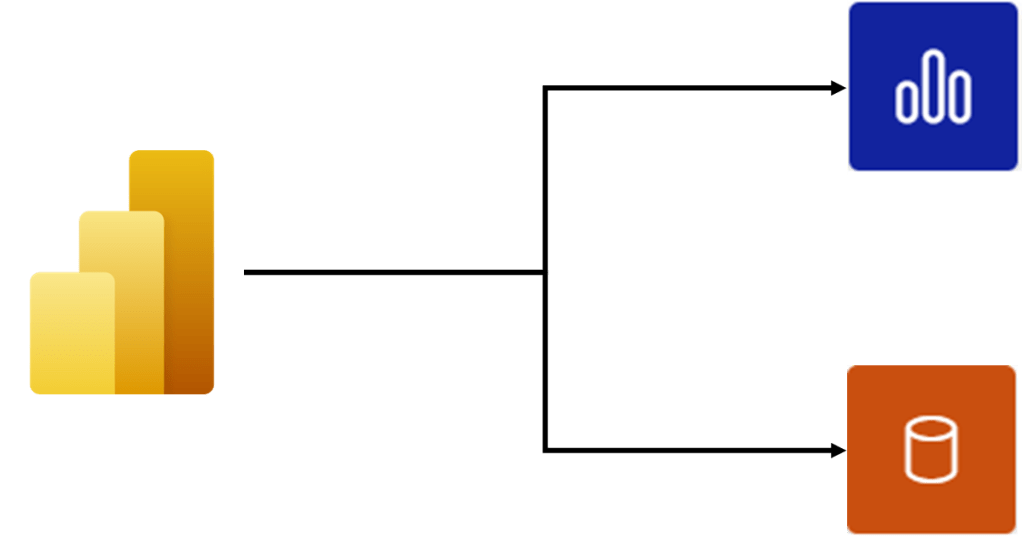
Before we look into the .bim file, we need to take a quick look at how a Power BI Report is built up. It is divided into two components: Report and Dataset

The Dataset is the data model that holds your data and the changes you have made to it as transformations or measures.

The Report contain all the report pages and visualizations you have set up. It is the visual part of your Power BI report. All of the visualizations in a report come from a single dataset. 

The fact that you can differentiate these two affect how you can enable source control in Power BI.

A .bim file is essentially the metadata of your Power BI datamodel. As this is a json file it works well with source control. We can then use this file to track changes in our Power BI Datamodel.

Pros:

  • Possible to track changes made to your datamodel.

Cons:

  • We are missing tracking on the visual part of your report. For instance if you make some changes to your visuals or report pages, that is not part of the .bim file.
  • Extraction of the .bim file requires an external tool and a manual step to your process.

Considerations:

  • To automate this you need to take advantage of the XMLA endpoint. However, this requires premium capacity or a premium per-user license.
  • You cannot deploy these changes back into Power BI Desktop. If you have a premium lisence you could use tools like ALM Toolkit to deploy changes to the XMLA endpoint.

Gerhard Brueckl has written an article on how you can automate some of the manual steps in this article: https://blog.gbrueckl.at/2022/02/automating-the-extraction-of-bim-metadata-from-pbix-files-using-ci-cd-pipelines/

Useful links:

I am speaking at SQLBits + Interview with WIT — 23. Jan 2023

I am speaking at SQLBits + Interview with WIT

So exited to share that I will be speaking at #SQLBits!

I will present two sessions:

Power BI Datamarts – What, How and Why?
A 20 min lightning sessions where we will demo the main features of Power BI Datamarts and see if we can conclude on when it is a good idea to take advantage of this Power BI Premium feature.
Building trust in your data. Why Data Governance is the key to success
A 60 min session where I will present with my partner in crime Johan Ludvig Brattås. We will combine the theory behind Data Governance with some practical examples and use cases in Pureview.

Check out the full agenda here: https://events.sqlbits.com/2023/agenda

And I had a true fangirl moment of Friday when Leslie Adams and Mala Mahadevan interviewed me on my sessions. Have a look at that and the other WITs sessions on the Data Platform WIT on Youtube!

What, How, When and Why on Power BI Governance — 21. Dec 2022

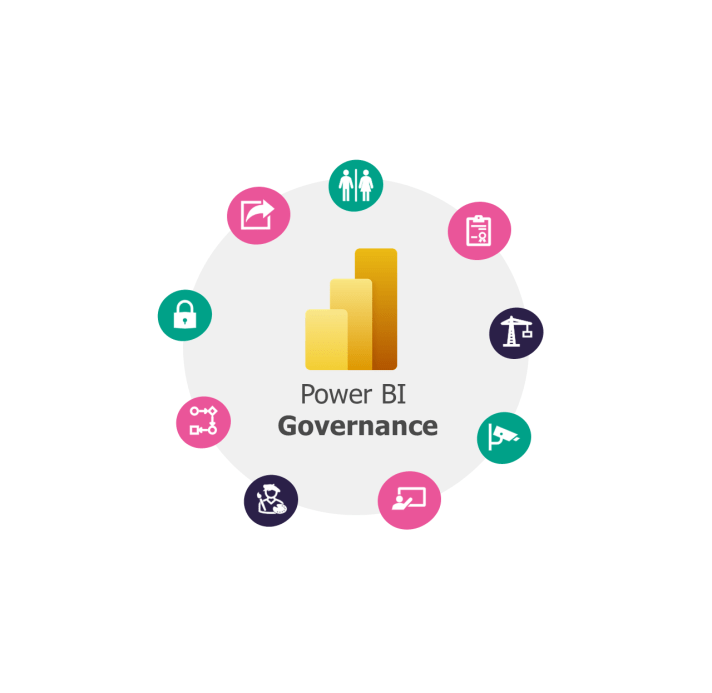
What, How, When and Why on Power BI Governance

The What, How, When and Why on Power BI Deployment Pipelines!

  1. What is Power BI Governance?
  2. How can you set up Power BI Governance?
    1. Power BI Governance Kick-start!
      1. Roles and Access management
      2. Processes
      3. Styleguide
      4. Monitoring
      5. Training
    2. Microsoft Power BI Implementation Plan
    3. Ásgeir Gunnarsson’s Power BI Governance Series
  3. When should you use Power BI Governance?
  4. Why should you use Power BI Governance?

What is Power BI Governance?

Power BI Governance is supposed to help you out with leveraging the value and insights from your Power BI Reports.

Let’s start with what is Governance.

Governance is the process of interactions through the laws, norms, power or language of an organized society[1] over a social system (family, tribe, formal or informal organization, a territory or across territories), (Wikipedia)

Then what is Power BI Governance?

Power BI Governance is the policies, processes, roles, rules and guidelines to ensure a level of control and management to leverage the value of Power BI, (from Marthe’s head)

How can you set up Power BI Governance?

This is not an easy question to answer within a short hill sprint. A more detailed article might be needed here, but – let’s start with the most important.

Every Power BI Governance will be set up differently for each organisation. I, therefore, think a set of open questions to start your journey makes the most sense.

Below I have listed a set of domains with questions and if you can answer these I think you have a good starting point for your Power BI Governance! You might also not need all the domains, or maybe some of these can be scaled down for you – it depends on how your organization uses Power BI.

Further down in this post I have listed the documentation on this from Microsoft as well as from my friend Ásgeir Gunnarsson that provide two different approaches on how to take on Power BI Governance.

Power BI Governance Kick-start!

Roles and Access management
  • What roles do you need?
  • Do you need any hands-on roles defined?
    • Report Developer Role
    • Report Consumer
    • Power BI Business Analyst
    • Other?
  • Do you need any Power BI Management roles?
    • Power BI Administrator
    • Report Owner
    • Workspace/App owner
    • Data Owner
    • Other?
  • What are the scope and responsibilities of these roles?
  • What accesses should they have?
  • What are they allowed to do and not to do?
  • What is the level of access for these roles?
  • What processes do these roles need to follow?
Processes
  • Development Process
    • Who can develop Power BI Reports?
    • What sources can you use for your reports?
    • Is there a best practice for reusing dataflows, datasets or datamarts?
    • Where do you store your report? Are there for instance a pipeline in DevOps set up for versioning control? A common OneDrive folder to save your work? Or should you use the Deployment Pipelines in Power BI Service?
    • Should there be any guidelines on Import vs Direct Query?
  • Publishing Process
    • Who can publish and to what workspaces?
    • Who can set up a workspace in Power BI Service?
    • What are the access guidelines to the workspace and who manages these?
    • What are the accessibility guidelines for the app and who manages these?
    • Should you use Deployment Pipelines or a DevOps pipeline when publishing?
    • Are there any sign-offs that need to be done before publishing?
    • Any checklist that should be considered before publishing?
  • Quality sign-off process
    • This quality process could be a part of the publishing process or something that is repeated in defined intervals to ensure the quality of existing reports in Power BI Service.
    • What should be evaluated in this process? What ensures good Power BI quality?
    • Data modelling?
    • DAX code?
    • Should there be a checklist of best practices on how to improve the performance of the report itself?
  • Security process
    • Should comply with the security rules that already exist for the overall company
    • Is it ok to connect to all data sources? Are there any limitations here?
    • How do you secure:
      • App
      • Workspace
      • Report
      • Dataset
      • Gateway connections
    • When and how to use:
      • AD groups
      • Row-level security
      • Data source security
  • Sharing Process
    • What reports/Datasets can be shared?
    • Are there any limitations on sharing content across business areas, data domains or to another organization?
    • How can you share content for the different Power BI objects (Apps, Workspaces, Reports, Datasets, Dataflows, Datamarts, Deployment Pipelines etc.)?
  • Administration Process
    • How should the Power BI tenant be managed?
    • What settings in the tenant should be fixed?
    • How are these settings and the reasoning behind these documented?
    • When can you change tenant settings?
    • How are the users of Power BI informed when such changes are made?
    • How can a new administrator be added?
Styleguide
  • Do you want to provide strict rules or guidelines?
  • Should you have a Power BI template?
  • Are there any colour standards, or themes that should be used?
  • Any guidelines on the usage of logos?
  • Should there be standardization on where you place different types of visuals on a report page?
  • Any best practices on the type of visuals that should be used?
  • Should there be different templates for different levels of reporting (Management Report, Operational Report, Trend report, etc.)?
Monitoring
  • I don’t think there should be a question on whether or not you should perform monitoring, but it could be good to decide on:
    • What role is responsible for following up on monitoring?
  • There are different ways of monitoring your Power BI objects.
    • Track user activities in Power BI. Read more HERE
    • Power BI Premium capacities: App delivered by Microsoft. Read more HERE.
Training
  • Should there be any training?
    • (I think the answer here should be Yes. I mean, think of all the amazing governance you have just set up. People need to know that this exists and how to use it. )
  • Should there be different training for different roles?
  • Is the training mandatory?
  • Should some roles get the training with a set interval? (Every year, Every other year)

Microsoft Power BI Implementation Plan

Microsoft got a Power BI Adoption Roadmap and a Power BI Implementation Plan that provides a step-by-step roadmap you can take advantage of.

Power BI Adoption Roadmap steps:

Key takeaways:

  • The power BI Adoption roadmap provides a broader view of how you should move forward when implementing Power BI. You start out by evaluating maturity, data culture and how you should govern your solution.
  • By going through this roadmap you end up with an overview on the current state of each point mentioned above, and you should be able to pinpoint the next steps to how you can achieve your future state.

Power BI Implementation Guideline steps:

  • BI strategy
  • User needs and opportunities
  • Authoring tools and user machines
  • Tenant setup
  • Subscriptions, licenses, and trials
  • Roles and responsibilities
  • Power BI service oversight
  • Workspaces
  • Data management
  • Content distribution and sharing
  • Change management and deployment
  • Security
  • Information protection and data loss prevention
  • Power BI Premium
  • Gateways
  • Integration with other services
  • Auditing and monitoring
  • Adoption tracking
  • Scaling and growing

Key takeaways:

  • The implementation guideline focus also on technical implementation, and not only governance. In that sense, they get a bit technical which is nice!
  • The Power BI Implementation guideline is under construction, meaning that all articles have not been created yet.

Ásgeir Gunnarsson’s Power BI Governance Series

Also, my friend Ásgeir Gunnarsson has set up a great article on a Power BI Governance Series.

I think this is a great overview of what to do when implementing Power BI Governance without making it too big. In contrast to the Microsoft documentation, this is a bit easier to wrap your head around (I would argue).

Key takeaways:

  • Ásgeir focus on the non-technical aspects of data governance and why this is so important.
  • He describes a Power BI Governance Strategy by defining five pillars:
    • People
    • Processes and framework 
    • Training and support
    • Monitoring
    • Settings and external tool
  • My approach to data governance is inspired by Ásgeir’s work. You should check it out!

When should you use Power BI Governance?

Well, you should always use Power BI Governance, but here are some specific points for when you REALLY should use Power BI Governance.

Also, how much governance, and for what domains you choose to focus on should vary based on the size and complexity of your organization.

When there are multiple report developers and Power BI resources that are not working in the same team (and hence would therefore not necessarily have a common way of working with Power BI).

When you have a large organization gathering data from multiple data sources, and delivering reports for multiple business areas.

When there is a need to control access, source connections, and improve overall control and quality of your Power BI Reports, Dataflows, Datasets, Datamarts and usage. Have your reports gotten out of control?

Why should you use Power BI Governance?

In need of some points to add to your presentation when trying to convince the sponsors or IT department that Governance is needed for your Power BI?

  • Improves trust in your entire analytical database solution. If the reports continuously deliver the right insights and are findable and trustworthy, the overall view of your analytical platform will increase. Why spend a lot of time governing your database, when your Power BI Reports are all over the place?
  • Increased report quality – both on the user experience side and data quality.
  • Accelerate your organization to becoming data-driven. When your reports are both trustworthy and deliver high-value insights, making business decisions based on data becomes a lot easier.
  • Competitive advantage in the market.
  • You get more out of your Power BI resources as they are not needed to answer ad-hoc questions, dig into duplicate reports or KPIs, errors, access control that went wrong, etc. They can now focus on creating that insight from that data!

Useful links:

When should you use Power BI Dataflows vs Power BI Datamarts? — 13. Dec 2022

When should you use Power BI Dataflows vs Power BI Datamarts?


I have previously written articles on the What, How, When and Why of Power BI Datamarts and Power BI Dataflows. Have a look below if you want to get a quick overview of the two features of Power BI Service.

But when should you use what?

Power BI Dataflows vs Power BI Datamarts

Let’s revisit the When of both Power BI Dataflows and Power BI Datamarts!
Use casePower BI DataflowPower BI Datamart


Tables that are reused throughout your organization
Dataflows are particularly great if you are dealing with tables that you know will be reused in your organization, e.g. dimension tables, master data tables or reference tables.You can also reuse a datamart, but it is unnecessary to build a datamart to solve this use case.


Azure Machine Learning and Azure Cognitive Services
If you want to take advantage of Azure Machine Learning and Azure Cognitive Services in Power BI this is available to you through Power BI Dataflows. Power BI Dataflows integrates with these services and offers an easy self-service drag-and-drop solution for non-technical users. You do not need an Azure subscription to use this but it requires a Premium license. Read more about ML and Cognitive Services in Power BI Dataflows here.When looking through Power BI Datamarts today I cannot see this functionality easily available. Dataflows was however designed to solve this use case and is, in my opinion, a good place to start.


Incremental refresh
Power BI Dataflows provides the possibility to incrementally refresh your data based on parameters to specify a date range. This is great if you are working with large datasets that are consuming all your memory. However, you need a premium licence to use this feature.It is also possible to set up incremental refreshes for your separate tables in your Datamart. If you have a couple of large tables within your datamart, this could be a nice feature to take advantage of.


Ad-hoc SQL querying and data exploration
You can explore your data through a dataflow, but it is not possible to run SQL queries with dataflows.Datamarts are particularly great if you want to do ad-hoc querying or data exploration of your data as sort, filter, and do simple aggregation visually or through expressions defined in SQL
This image has an empty alt attribute; its file name is image-17.png

Self Service Data modelling
Dataflows do not support setting up relationships between tables, building measures or writing DAX. A great thing with Power BI Datamarts is that you can model your star schema right in Power BI Service. That way you do not have to wait for the data warehouse to make smaller (or larger) improvements or changes to your data model as you can do these changes yourself – but remember that permanent transformations should be moved as close to the source as possible. This also enables Mac users to do some modelling in Power BI Service.


Need to connect to your data in Power BI Service through a SQL endpoint.
Not possible with dataflows.Power BI datamarts provide a SQL end-point to your data. This is great if that is a requirement from developers or data analysts. You can then use database tools as SSMS to connect to your datamart as any other DB, and run queries.

Let me know what you think and if you have other use cases where the tools should be compared.

Useful links:

What, How, When and Why on Power BI Deployment Pipelines [Hill Sprint] — 7. Dec 2022

What, How, When and Why on Power BI Deployment Pipelines [Hill Sprint]

The What, How, When and Why on Power BI Deployment Pipelines!

  1. What are Power BI Deployment Pipelines?
  2. How can you set up Power BI Deployment Pipelines?
  3. When should you use Power BI Deployment Pipelines?
  4. Why should you use Power BI Deployment Pipelines?

What are Power BI Deployment Pipelines?

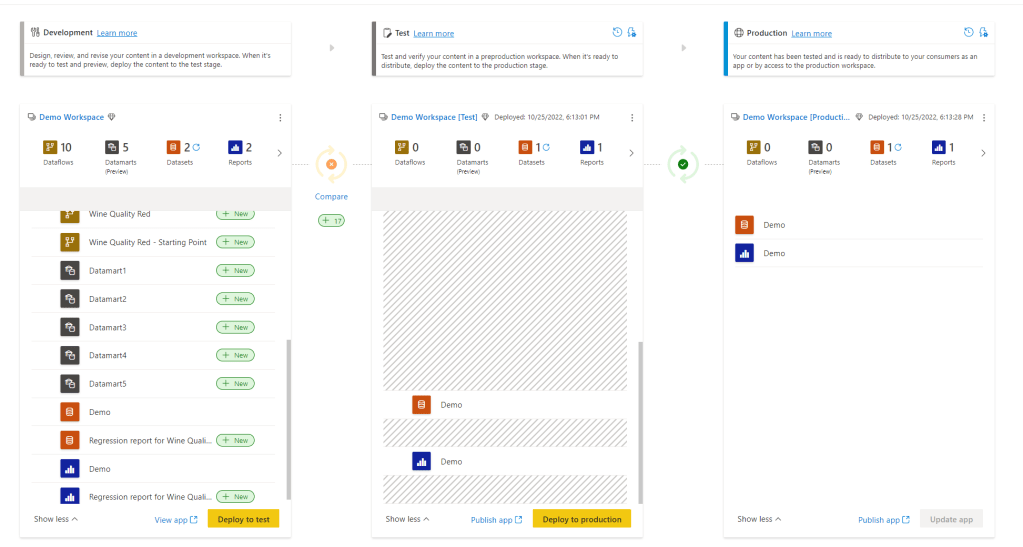
Power BI Deployment pipelines makes it possible for creators to develop and test Power BI content in the Power BI service, before the content is consumed by users. It provides a lifecycle management solution for your Power BI content!

Deployment Pipelines creates a development, test and production workspace for you where you can view the differences between the environments. You can also set up deployment rules that change your data source when deploying from one environment to the next. Like changing from test data in the test workspace to production data in the production workspace.

You can also review your deployment history to monitor the health of your pipeline and troubleshoot problems.

Hence, Deployment Pipelines can help you collaborate with other developers, manage access to testers and automate data source connections.

If you want to learn more on Power BI Deployment Pipelines, you can read the documentation from Microsoft here.

What Deployment Pipelines do NOT help you with is version control. This brings us on to another existing topic that I have not yet created a blog post on – Azure DevOps and Power BI. However, my friend Marc has. You can read his post on how you can utilize Azure DevOps to manage version control on your Power BI Reports here.

How can you set up Power BI Deployment Pipelines?

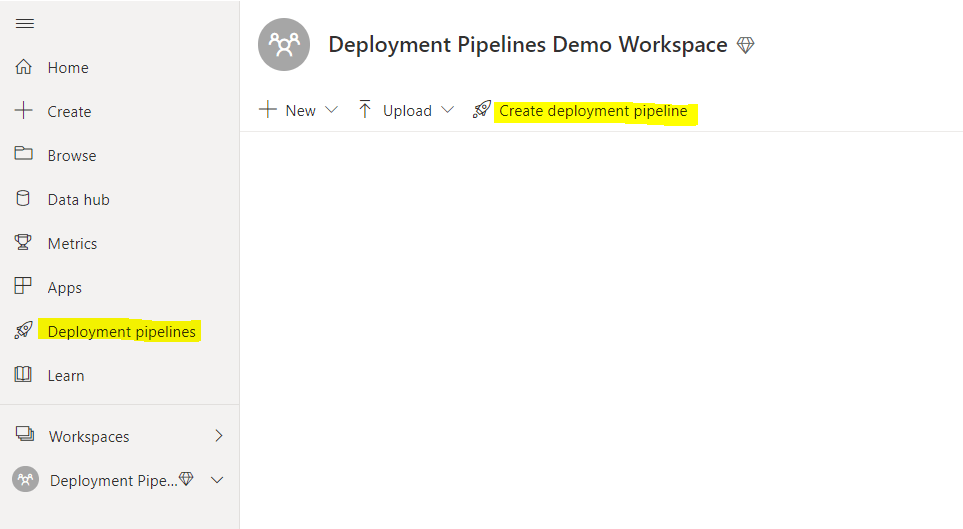
You set up a Power BI Deployment Pipelines in Power BI Service. This is done through the menu on your left side when login into Power BI Service OR directly in the workspace you want to assign to a Deployment Pipeline.

You then follow these steps:

  1. Click “Create a pipeline”

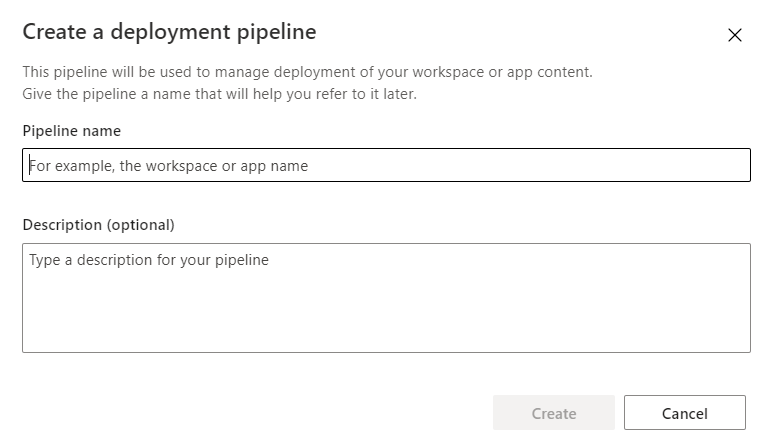
2. Fill in the name of the pipeline. This needs to be unique for your organization. Make sure the name makes sense for other developers and fill in a description as well.

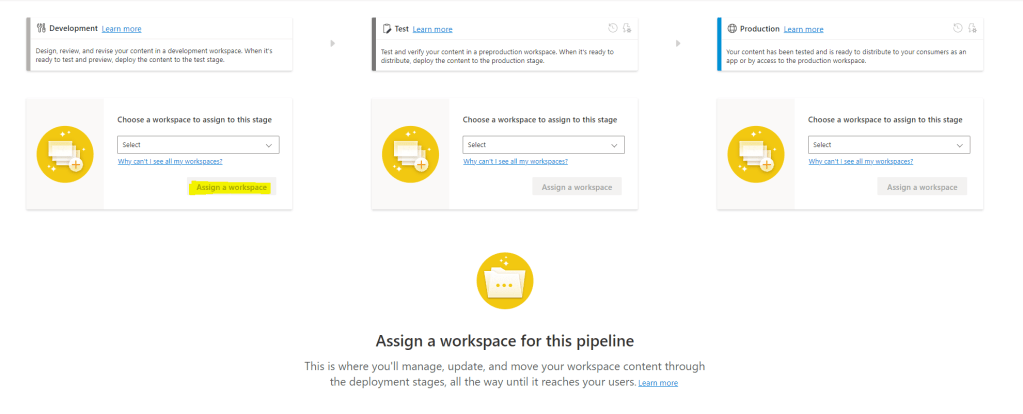
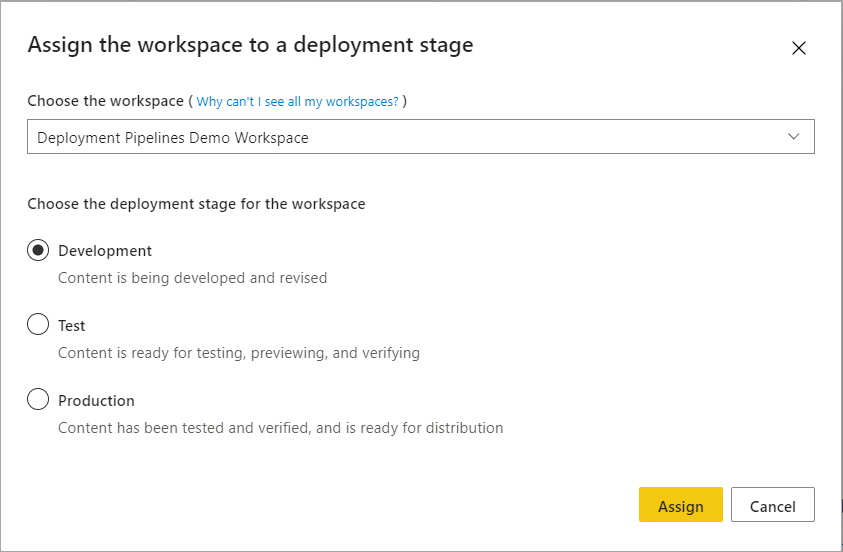
3. Assign a workspace (if you did not create the pipeline directly from the workspace)
If you created the deployment pipeline directly from the workspace you need to decide if you want to assign the existing workspace to Development, Test or Production. Essentially you are deciding if the existing workspace already is a production environment or a development environment (it could also be a test environment, but dev and prod would probably make the most sense for most).

In the following example, the Development environment was chosen as the starting point/the workspace was assigned to Development.

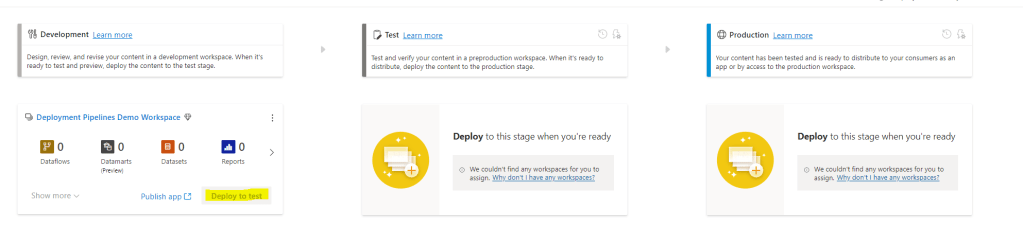
4. Choosing “Deploy to test” will automatically generate a test workspace for you. Inside this workspace, you can then decide to create an app that can be used to view the content for business testers if you don’t want to give access to the workspace.

5. Choosing “Deploy to production” will automatically generate a production workspace for you. This will be where you provide access to the reports and datasets, datamarts and dataflow to your business analysts that want to take advantage of these assets, and where you create your app to provide access for report consumers.

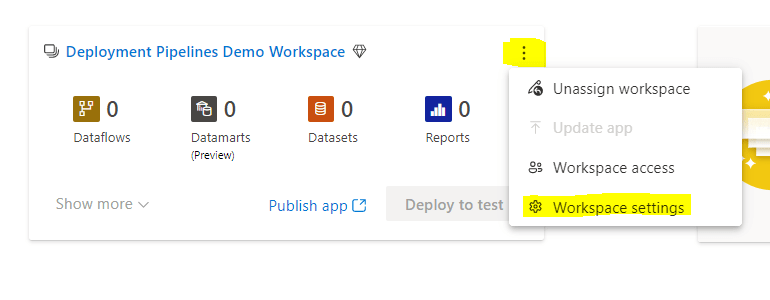
6. You can change the name of the workspaces by clicking on the ellipse and choosing “Workspace settings”

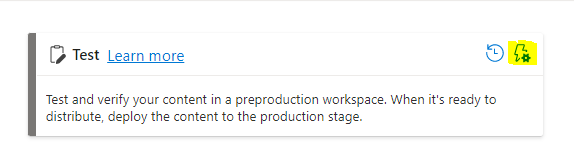
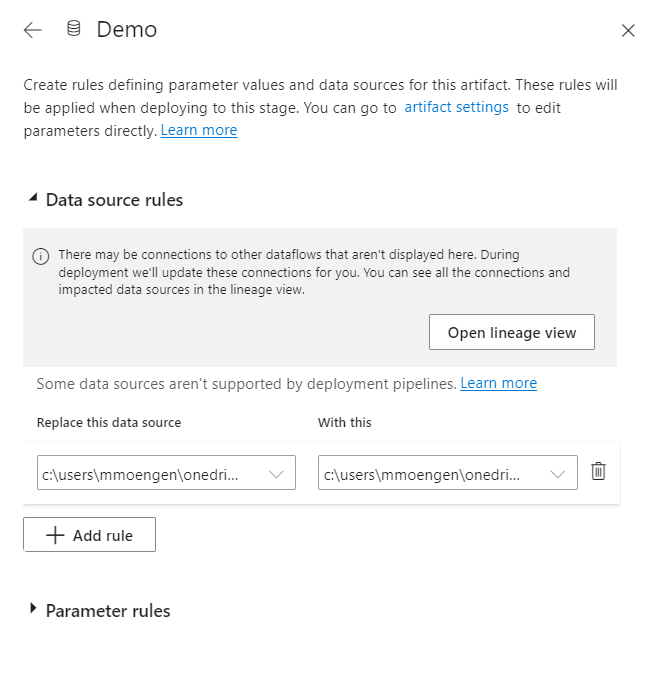
7. By selecting the lightning bolt above the Test or Production environment you open up “Deployment Settings”.

Depending on the data source you can define deployment rules for your data source. For instance, you can change the file path, database or parameter when deploying from test to production changing the data from test data to production data. Nice!

8. Create apps on top of the development, test and production workspace as needed and assign access to relevant users.

You need premium capacity to get access to Power BI Deployment pipelines.

When should you use Power BI Deployment Pipelines?

When there is a need to provide business users with a test environment to test reports, test the layout of the app or new functionality without mixing with reports that already are in production. Additionally, when there is a need to provide more technical testers with access to a workspace with only content that is ready for testing.

When there are multiple report developers and business domains and there is a need for collaboration and exploration. The development workspace provides an area where multiple Power BI developers can make changes and adjustments to the same files (as long as these changes are made in Power BI Service).

When there is a need to separate test data from production data, where reports should not connect to production data unless the report itself is ready for production.

Why should you use Power BI Deployment Pipelines?

Power BI Deployment Pipelines help us with the lifecycle management of Power BI content

  • Provides a tool to improve and automate the management of the lifecycle of Power BI content
  • Provide a visual overview of developer content and the gap between development, testing and production.
  • Improved access control as you can provide data analysts with access to test apps, and super users to test workspaces instead of being forced to send the reports to your production workspace/app. You also ensure that production data is not made available unless the content is ready for production.
  • Provides collaboration environment for developers
  • Automates source connections when deploying

Useful links:

What are Hill Sprints?

I am having a series called hill sprints (since we are climbing mountains – hehe) that will provide a to the point introduction on a topic covering the What, How, When and Why.

Why hill sprints?

Hill sprints are essentially a form of interval training – probably one of the more intense (but engaging) options. They are quick, brutal and to the point. Let me know if you have another fun analogy towards climbing mountains that would make sense for a series name! (Having way to much fun with this)

First Hill Sprint Series will be on Power BI Service. In this series we will go through some of the main components in Power BI Service, explaining what is it, how can you set it up, when should you use it, and why should you use it.

Hopefully, this can provide some quick insights and knowledge on the components and help decide if this is the tool for you with your current setup or challenge.

Advice from the Women In Tech — 24. Nov 2022

Advice from the Women In Tech

I was lucky enough to speak at the Pass Data Community Summit 2022 in Seattle last week. This is the world’s largest data conference, with many great sessions to join and speakers to learn from.

On Thursday was the #WomenInTech lunch, where a panel of amazing women sat down to discuss some of the challenges of being a woman in tech today. The panel consisted of Anna Hoffman, Shabnam Watson, Blythe Morrow, Leslie Andrews, and Jennifer McCown. I found their debate, discussion and advice very interesting, and was thinking that there might be more women out there that would benefit from their experience. I, therefore, summarized some of the discussion points here in hopes that more women (and men!) can read it.

Please remember that the words here are coming from how I remember the talk and that none of the mentioned women should be held accountable for what I write – unless you like what you read. Then they get all the credit!

If you want to learn more about #WomenInTech, you can click HERE.

How can you make sure your voice is heard in meetings when you are interrupted?

Buddy up! If possible, find yourself an ally before the meetings (or in general) that can help you stop the interrupter or help give you credit for the ideas that were in fact yours. Of course, in an ideal world, the best thing would be to stop the interrupter yourself. Still, as was discussed, you can risk being labelled and the goal of the meeting itself can be lost. Many do not want to confront this situation as the greater cause that is discussed and harmony of the meeting is more important. A buddy that can help you get your word across and give the credit you deserve could therefore help.

Another interesting topic on this was if this in fact would serve as a way to undermine a woman. Different viewpoints were shared but summarized one could argue that helping a woman (or another minority) get heard is a way to help our industry. It would be a step in the right direction on correcting behaviour or (unconscious) biases.

How can you turn the agenda in your direction without risking being labelled?

Instead of pushing your agenda, try asking open questions instead. This way the discussion can turn in the direction you want it to and help you get your word across without coming across as too intense. Again, it would be great if it was possible to opt for another view on a topic just like that, but sometimes you are not in a position to do so. Asking questions could be a good tool in such a situation. And this ofc holds for both men and women.

How to get rid of imposter syndrome?

Imposter syndrome can sneak up on all of us and in the worst case stop us from taking opportunities that come our way, or seeing the potential we have and acting on it. In order to avoid this, some great advice was given:

Think of yourself as a guide instead of an expert. It is okay to not know the answer to everything. The most empowering thing you can say is “I do not know the answer to that question, let me check and come back to you”.

Have a goal of lifelong learning. You will never know everything, and your goal is always to learn something new.

How can you make sure you get the correct pay?

This might be a bit depressing, but you should assume you are paid too little compared to your male peers. Do research on what similar roles with comparable experience and responsibility are paid. Then go to your boss and ask for a raise based on your research. And go high. The worst you can get is a no.

How do you stay motivated?

I love this advice: Get yourself a kitchen cabinet! So, what is a kitchen cabinet?

“Kitchen cabinet” refers to any group of trusted friends and associates, particularly in reference to a president’s or presidential candidate’s closest unofficial advisers (Wikipedia).

Build yourself a kitchen cabinet of trusted advisors that can give you advice, help and support when needed. Also, let these trustees know they are a safe place for you. It will help you keep on going, and gain confidence and strength when needed.

Some of this might not work for you. Or you might think that “This is no longer necessary today”, or “This is not how you empower women”. In that case, maybe you have different experiences from the tech world than me – and nothing makes me happier! That means we are moving in the right direction. However, I still think there is some more work to be done.

Let me know what you think – or even better: Share YOUR advice in the comments below!

PASS Data Community Summit 2022 in Seattle! — 21. Nov 2022

PASS Data Community Summit 2022 in Seattle!

I am writing this post as I am heading back to Norway and should be sleeping on the plane to walk off the plane in perfect sync with CET. So much for that plan. Posting it a bit later though.

I want to share my experience with the PASS Data Community Summit from the previous week. Hopefully, I can inspire some of my peers to join in person, remotely or even better as a speaker next year.

This was my first time attending PASS ever, and I was lucky enough to participate as a speaker. For those of you that do not know what PASS is, it is the largest data conference in the world with 370 sessions, and 364 speakers from all over the world!

It lasts from Monday to Friday, with precons (full-day training on one topic) on Monday and Tuesday, and regular sessions from Wednesday – Friday. I presented my session with Johan Ludvig Brattås on “Building trust in your data – why Data Governance is key to success” on Wednesday. Thank you to everyone who came to our session, the questions and the great discussions. It was a lot of fun presenting this to you.

SQLSaturdayOregon

Johan and I planned our trip to the US so that we could also join the SQLSaturdayOregon the Saturday prior to PASS. That was a perfect way to kick off the tour. The amazing organizers of SQLSaturdayOregon arranged for a waterfall tour the Friday prior, and we had a lot of fun presenting on Synapse + Power BI + Purview = True – why the combination of these three is a match made in heaven on Saturday. This was our first time presenting this session together, and I want to thank Johan for including me in this, as this originally was his session – and in general for being an AMAZING mentor.

https://sqlsaturday.com/2022-11-12-sqlsaturday1035/

More than just a community

It was such a great time. I loved meeting the SQLCommunity. As was mentioned multiple times during the conference, this is more than just a community, this is family. And I am really surprised and humbled that I am now a part of this. If you know something you share it. If you have a question you can ask, and someone will help you.

And also, it was such fun with all the social activities. Karaoke, smashing crabs with a hammer, hanging out at the community zone, laughing and making new friends.

I hope to go back next year, for this was truly unique.

Thank you to Redgate for hosting such a great conference and making my first Pass experience one to remember!

/Marthe

What, How, When and Why on Power BI Datamarts [Hill Sprint] — 8. Nov 2022

What, How, When and Why on Power BI Datamarts [Hill Sprint]

The What, How, When and Why on Power BI Datamarts!

  1. What are Power BI Datamarts
  2. How can you set up Power BI Datamarts?
  3. When should you use Power BI Datamarts?
  4. Why should you use Power BI Datamarts?

What are Power BI Datamarts

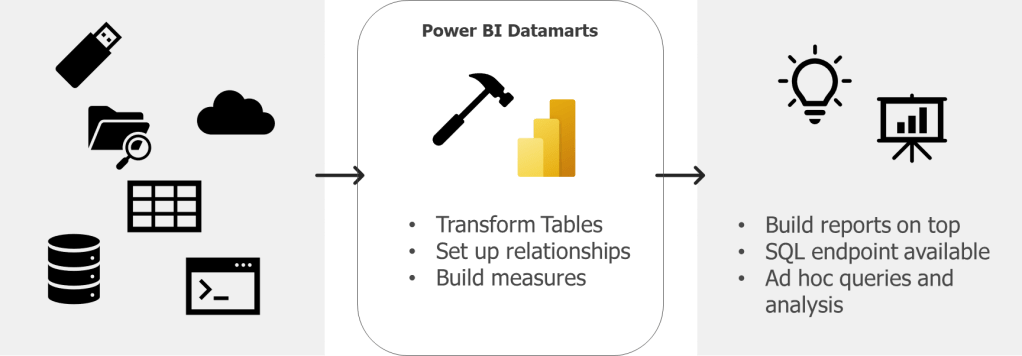
Power BI Datamarts are a self-service analytics solution that provide a fully managed database that enables you to store and explore your data in a relational and fully managed Azure SQL DB.

That means that you can connect your sources, transform these, set up relationships between the tables and build measures – resulting in a data model in Azure SQL database that you can connect to as any other database.

Datamarts are not a new thing though. A datamart in the world of a data warehouse is the access layer containing a focused version of the data warehouse for a specific department that enables analytics and insights to the business. A datamart could be a star schema designed to provide specific KPIs.

Hence, in Power BI Datamarts we can now build this access layer for specific business domains in Power BI Service as a star schema with relationships and measures.

If you want to learn more on Power BI Datamarts, you can read the documentation from Microsoft here.

How can you set up Power BI Datamarts?

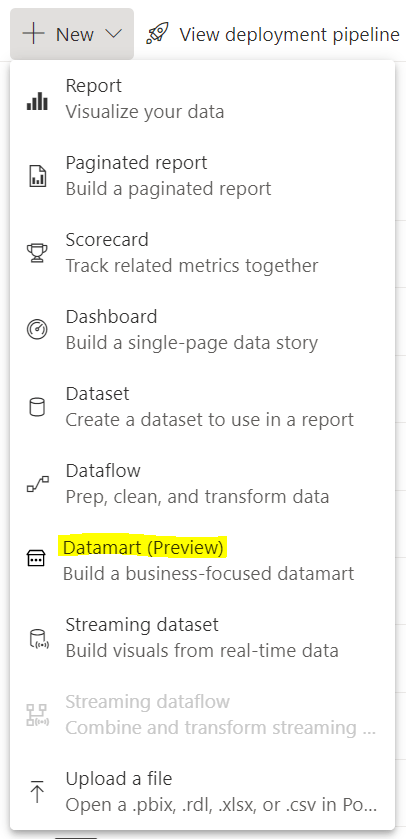
You set up a Power BI Datamarts in Power BI Service. This is done through the workspace you want to hold the datamarts and by clicking “New”.

You then do the following:

  1. Choose source type and connect to your source
  2. Load the data source and transform this (if you want to) in Power Query
  3. Then the data source is loaded into a datamart. You can now do the following based on what you want and need to do to your data:
    • Set up relationships
    • Build measures
    • Run queries with SQL
    • Run queries using low-code functionality

You need premium capacity or premium per user to get access to Datamarts.

When should you use Power BI Datamarts?

Datamarts are particularly great if you want to do ad-hoc querying or data exploration of your data as sort, filter, and do simple aggregation visually or through expressions defined in SQL

A great thing with Power BI Datamarts is that you can model your star schema right in Power BI Service. That way you do not have to wait for the data warehouse to make smaller (or larger) improvements or changes to your datamodel as you can do these changes yourself. If these changes should be permanent or a in between solution while one wait for the datawarehouse depends on the governance that is set up.

In addition, Power BI datamarts provide a SQL end point to your data. This is great if that is a requirement from developers or data analysts. You can then use database tools as SSMS to connect to your datamart as any other DB, and run queries.

Why should you use Power BI Datamarts?

Power BI Datamartscan help us solve a range of challenges with self-service BI. Many of these are similar gains as one could get from Power BI Dataflows.

  • Improved access control as you can provide data analysts with access to the datamart instead of direct access to the data source
  • One source of truth for business logic and definitions
  • Provides a tool for standardization on the ETL process
  • Enables self-service BI for non-technical users
  • Enables reusability

Specific worth from datamarts (compared to Power BI dataflows) are:

  • Self-service solution for quering and explore data for data analysts, as well as for non-technical users as you can query the datamart using low-code functionality
  • Reduce time to production if the alternative is to wait for the needed changes or development to be delivered through the data warehouse. Also, Datamarts developers do not need code experience, and can ingest, transform and prepare the models using existing knowledge from Power Query and Power BI Desktop.
  • Power BI Datamarts support row-level-security (where Power BI Dataflows do not)

Useful links:

What are Hill Sprints?

I am having a series called hill sprints (since we are climbing mountains – hehe) that will provide a to the point introduction on a topic covering the What, How, When and Why.

Why hill sprints?

Hill sprints are essentially a form of interval training – probably one of the more intense (but engaging) options. They are quick, brutal and to the point. Let me know if you have another fun analogy towards climbing mountains that would make sense for a series name! (Having way to much fun with this)

First Hill Sprint Series will be on Power BI Service. In this series we will go through some of the main components in Power BI Service, explaining what is it, how can you set it up, when should you use it, and why should you use it.

Hopefully, this can provide some quick insights and knowledge on the components and help decide if this is the tool for you with your current setup or challenge.