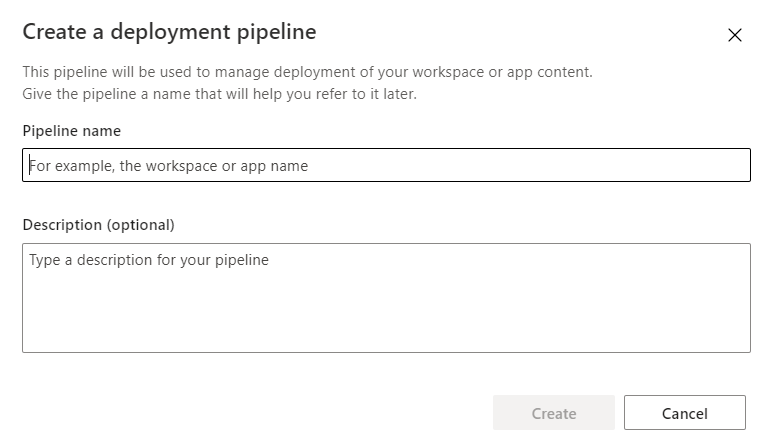
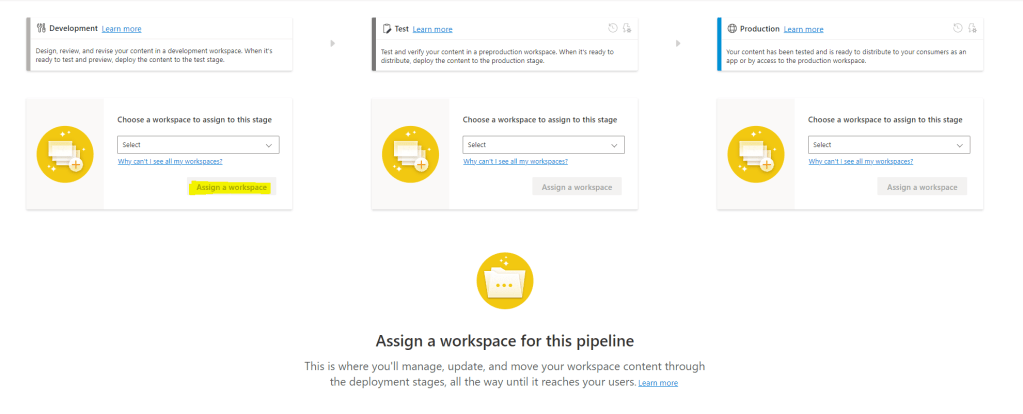
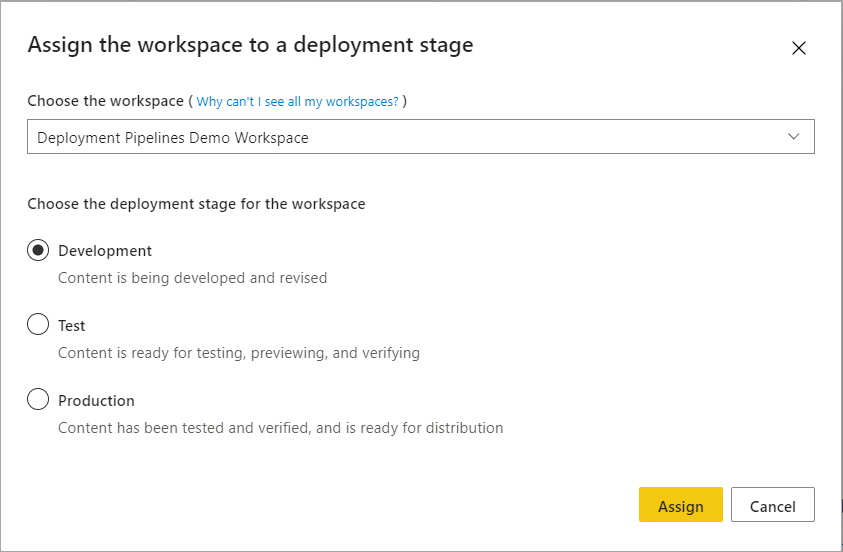
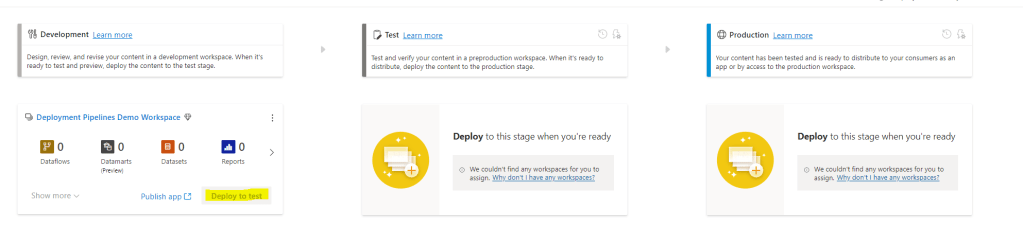
Marthe Moengen

Gal in a Cube

Arcthitecture best practices in Fabric that enables your data governance journey — 24. Jun 2025

Arcthitecture best practices in Fabric that enables your data governance journey

With its low-code approach, Microsoft Fabric enables anyone to take on tasks that once required a data engineering background. It accelerates development, supercharges workflows, and integrates seamlessly with AI, both enabling AI and using AI to make you even more productive. Definitely super cool. 😎

But with this new speed and power comes a new level of responsibility. As AI becomes deeply embedded in our tools and decisions, the old adage still holds true: garbage in, garbage out. That’s why the architecture of your Microsoft Fabric environment matters more than ever.

Why? Because with the ease and speed of things in Fabric today, it is SO SIMPLE to create things, so how fast can you create a mess for yourself? Anyone using Power BI for a couple of years and going with the self-serve approach? Then you know what I am talking about.

So, a strong foundation ensures compliance, security, and data integrity to ensure you never lose control, end up with duplicates and ultimately low-quality data, because when AI acts on bad data or a flawed setup, the consequences can scale just as fast as the benefits.

Let’s take a look at the what initial steps you should consider for your Fabric architecture and why!

Jump to:

  1. How should you structure your items (Lakehouses/Warehouses) in Microsoft Fabric?
    1. ✅ Pros of Item Separation in Microsoft Fabric
    2. ⚠️ Considerations of Item Separation in Microsoft Fabric
  2. How should you structure your workspaces in Microsoft Fabric?
    1. ✅ Pros of Workspace Separation in Microsoft Fabric
    2. ⚠️ Cons of Workspace Separation in Microsoft Fabric
  3. How should you structure your Domains in Microsoft Fabric?
    1. ✅ Pros of Domain Separation in Microsoft Fabric
    2. ⚠️ Cons of Domain Separation in Microsoft Fabric
  4. How should you structure your Capacities in Microsoft Fabric?
    1. ✅ ️ Pros of Capacity Separation in Microsoft Fabric
    2. ⚠️ Cons of Capacity Separation in Microsoft Fabric

How should you structure your items (Lakehouses/Warehouses) in Microsoft Fabric?

I like to think of Fabric in this order when making the first decisions on the HOW we are going to set things up. Items define your options on workspaces, and workspaces define your options on domains and capacities. So, the first thing you need to think about is item separation.

Let’s use the medallion architecture as an example throughout this blog post to have something many are familiar with.

Would you like to separate the bronze, silver and gold layer into separate items – or do you want to group them into one lakehouse or warehouse? Or a mix?

✅ Pros of Item Separation in Microsoft Fabric

Clear Layer BoundariesEnforces architectural clarity between Bronze, Silver, and Gold layers.
Minimizes accidental data leakage between stages.
Enhanced Security & GovernanceEnables more granular control over access (e.g., only data engineers consume Bronze; analysts consume Gold).
Improved DiscoverabilityEasier for consumers to find the right data at the right stage.
Promotes documentation and ownership via dedicated spaces. E.g. if you want to separate ownership on bronze/silver layer for source-aligned data products, while the gold layer provides consumer-aligned data products.
Improves discoverability (and lineage) in Purview as Items are best supported today.
Better Modularity & ScalabilityEach layer can evolve independently (e.g., switching ingestion logic in Bronze without touching Gold).
Encourages a microservice-style approach where each layer is self-contained.
Supports InteroperabilityEnables integration with various tools and personas by decoupling processing stages.

⚠️ Considerations of Item Separation in Microsoft Fabric

Increased ComplexityMore items to manage.
Requires well-defined conventions and documentation.
Operational OverheadMay lead to duplication of effort (e.g., repeated metadata or pipeline setup across layers).
Monitoring and orchestration across items become more complex.
Risk of Over-EngineeringNot all projects need full item separation; using it universally can slow down small teams.
Risks “compliance theater” without real added value if not paired with strong practices.
Dependency ManagementInter-layer dependencies may become fragile if naming, versioning, or schema tracking isn’t standardized.

Use it when: You need strong governance, multiple teams, or enterprise-scale structure.
Skip it when: You’re working fast, solo, or on smaller, agile projects.

How should you structure your workspaces in Microsoft Fabric?

When you have made your choices on item separation, you are ready to consider your workspace separation, as the item separation also (naturally) enables workspace separation.

Let’s use the medallion architecture as an example again.

Do you want to have all your layers in one workspace, or separate them across workspaces, or a mix?

Pros of Workspace Separation in Microsoft Fabric

1. Self-Contained EnvironmentsEncapsulation of logic and data for each team.
Reduced risk of accidental interference across unrelated areas.
Easier testing and deployment of updates in isolation.
2. Improved DiscoverabilityEasier to navigate than a massive, centralized workspace.
Reduces cognitive load for analysts and consumers.
Improves discoverability in Purview.
3. Stronger Governance & Access ControlDefine permissions on a need-to-know basis using the workspace for different development teams. Then have a more granular option for access control on the item level as well if needed.
Ensure compliance by segmenting sensitive data (e.g. some bronze data might be sensitive compared to gold layer)
4. Domain-Oriented OwnershipTeams can own, maintain, and evolve their domain-specific workspaces independently
Reduces bottlenecks by avoiding centralized gatekeeping
Encourages accountability and autonomy
5. Better ObservabilityErrors, performance, and usage can be scoped per workspace
Easier to trace lineage and operational issues within contained environments

⚠️ Cons of Workspace Separation in Microsoft Fabric

1. Cross-Workspace Dependencies Can Be PainfulSharing datasets between workspaces can involve more manual effort or pipeline complexity.
Lack of strong cross-workspace lineage tracking increases risk of versioning issues.
2. Coordination OverheadSchema changes or upstream updates must be communicated across teams. (Should you consider data product contracts?)
Governance, naming conventions, and SLAs must be actively enforced.
3. Risk of FragmentationWorkspaces can become inconsistent in structure, naming, and metadata practices
Onboarding new users becomes harder if standards vary widely
4. Initial Barrier to EntrySetting up multiple workspaces might feel like overkill
Single-workspace setups may be better for rapid prototyping or agile development

Use when: You have multiple domains or teams, need tight access control, or want to scale governance.
Avoid when: You’re prototyping, working with a small team, or need fast iteration across datasets.

*a consideration not discussed in this article for workspace separation is CI/CD

How should you structure your Domains in Microsoft Fabric?

When you have your workspace plan ready, you can take a look at domains.

Do you want to separate you domains on business use case alone, on technical teams, on data source, or a mix?

If you use a data mesh approach, you might want each domain to own the entire data flow from bronze to silver.

Suppose you want to enable your business domains, but still want to take advantage of some centralization in making the different data layers available. In that case, you might want to look at a domain separation as shown above.

Pros of Domain Separation in Microsoft Fabric

1. Reflects Business StructureOrganizing data by domain mirrors your org chart.
This reduces confusion and aligns data strategy with business operations.
2. Clear Ownership and AccountabilityEach domain owns its data products. This fosters a culture of accountability and ensures data is maintained by those who understand it best.
3. Decentralized Policy EnforcementDomains can enforce their own data quality, security, and compliance rules within their boundary.
This enables scalability without relying solely on a central team.
4. Improved Governance and ObservabilitySmaller, domain-focused scopes are easier to govern.
Monitoring usage, managing permissions, and auditing access becomes simpler and more meaningful.
5. Autonomy and SpeedTeams can build and release data products at their own pace.
They don’t need to wait on a centralized team to deploy pipelines or models.

⚠️ Cons of Domain Separation in Microsoft Fabric

1. Risk of SilosIf domains don’t collaborate or share standards, data silos can (re-)emerge inside of Fabric.
Interoperability must be intentionally designed.
2. Duplication of EffortMultiple teams might build similar models or transformations independently. Without coordination, this wastes time and creates inconsistency.
3. Tooling and Training OverheadEach domain team needs enough skill and support to manage its own pipelines, models, and compliance needs. This requires investment.

Use it when: Your org has distinct teams/domains and you want scalable ownership.
Avoid it when: You’re early in your journey or lack governance maturity.

How should you structure your Capacities in Microsoft Fabric?

Then finally, let’s take a look at your choices when it comes to Fabric capacities.

Do you want to use capacity separation to mirror your business domains, technical teams, environments or a mix?

If your organization requires separate cost management across business domains, you probably want to mirror the capacities and the domains.

Another separation you might consider instead of or in combination with the domain separation is to separate the capacities for the different environments. This can ensure performance. If you are taking advantage of federated development teams, you run a higher risk of someone creating a crazy dataflow that kills the entire capacity. Separating development and production can therefore be wise. This is also a way to maximise cost savings, as the development capacity does not need to be on 24/7 and can be scaled up and down as needed.

If your organisation exists across regions, you might also want to consider separating your environments based on different capacity regions. Be aware that it is currently not possible to move Fabric items across regions without a support ticket to Microsoft. Take some time to consider your needs and use cases before splitting.

Pros of Capacity Separation in Microsoft Fabric

1. Performance IsolationHigh-demand domains won’t be bottlenecked by low-priority processes elsewhere.
Development efforts won’t throttle production environments.
2. Cost Transparency & AccountabilityClearer tracking of compute and storage consumption per business domain/unit or team.
Easier chargeback/showback models for budgeting or internal billing
Data-driven capacity planning (who needs more/less and why)
3. Optimized ScalingCritical business domains can be scaled up.
Lightweight domains can be throttled or moved to shared capacity.

⚠️ Cons of Capacity Separation in Microsoft Fabric

1. Potential Resource WasteSmall or inactive domains may not fully utilize their assigned capacity. Wasted potential if workloads don’t justify a dedicated capacity.
Teams may leave unused resources running (e.g., long-lived Spark jobs) that are not discovered by the separate domains.
3. More Complex GovernanceDomain-level cost and performance management requires clear policies for scaling, shutting down idle jobs, prioritisation and governance around assigning capacity (shared vs dedicated).
Increased administrative overhead to right-size environments.

Use it when: you need performance isolation between teams or layers, want cost tracking per domain or department, domains have high or variable workloads, or you have governance in place for managing capacity.

Avoid it when: workloads are small or early-stage, teams lack cost or performance monitoring maturity, shared capacity meets your needs, or you want to minimize setup and management overhead.


Hope you found this article useful!

Stay updated on new blog posts and videos by subscribing to @GuyInACube on YouTube, follow me on LinkedIn or subscribe to the newsletter for this blog below to get the newest updates!

Start Your Data Governance Journey with the new Microsoft Purview: A Step-by-step guide — 1. Oct 2024

Start Your Data Governance Journey with the new Microsoft Purview: A Step-by-step guide

https://data-ascend.com/2025/06/11/start-your-data-governance-journey-with-microsoft-purview-the-complete-guide-videos-descriptions/


Microsoft Purview has gotten a serious makeover. It is not only a Data Catalog anymore, it is a data governance tool that includes data security, data catalogging, metadata management, data quality, data estate health monitoring and more.

I have created a mini-series on how to get started with building your data governance domains, and data products by scanning your Fabric data in Purview on my YouTube channel. This blog post summarizes the mini-series with some added descriptions.

Stay updated on new videos by subscribing to my YouTube Channel:

There are still features in Purview that are in preview, and there is a lot of development ongoing- existing! But that also means that some buttons and names have changed when you read this tutorial.

Jump to:

  1. 1. Upgrade to New Microsoft Purview
  2. 2. How to Register Your Fabric Data in Purview
    1. Scope your Fabric scan in Microsoft Purview
  3. 3. How to Create a Business Domain/Governance Domain in Microsoft Purview
  4. 4. How to Create a Data Product in Microsoft Purview
  5. 5. Set up Data Quality on Your Fabric Data Products in Purview

1. Upgrade to New Microsoft Purview

Overview: This video shows how to upgrade to the latest Microsoft Purview solution and access its new features.

2. How to Register Your Fabric Data in Purview

Overview: Learn how to register your Fabric data in Microsoft Purview by creating collections, connections, and scans.

I like to divide the data catalog part of Purview into two:

  1. Physical data estate with your Data Map and Data Assets
  2. Your logical data estate with Governance Domains and Data Products

In this video I look at how you can set up your Data Map and scan your physical data assets in Fabric.

Topics Covered:

  • Creating a new collection.
  • Setting up a connection to data sources.
  • Running scans to discover and register data assets.

Also check out the “Scope your scan” video below. This feature was released after I created the video. Now you don’t have to scan your entire Fabric Ecosystem, but can choose to scan based on workspaces.

Scope your Fabric scan in Microsoft Purview

Learn how to scope your data scans by workspaces to make your Purview scans more targeted and efficient.

3. How to Create a Business Domain/Governance Domain in Microsoft Purview

Overview: This video explains how to set up a governance domain for better data organization and governance. You can then group your data products into business domains later.

Topics Covered:

  • Step-by-step guide to creating a business domain.

In this video I call it a “Business Domain”, but Purview has later renamed it to Governance Domain, which I think is more fitting. You can then decide yourself if you want to separate your domains into Business Domains, Governance Domains, Data Domains, Technical Domains, etc. This will depend on your organizational setup.

4. How to Create a Data Product in Microsoft Purview

Overview: Discover how to create data products within Microsoft Purview to manage and catalog data more effectively.

Topics Covered:

  • Defining a Data Product and linking it to a Business Domain.
  • Connecting your physical Data Assets to your Data Product
  • Setting up terms of use for your Data Product and Data Assets
  • Setting up Request Access Policies for your Data Product

The Data Assets that we link to the Data Product are the physical data assets that we scanned in the previous video.

5. Set up Data Quality on Your Fabric Data Products in Purview

Overview: This video covers how to monitor data quality on your Fabric data products within Microsoft Purview.

Topics Covered:

  • Setting up data quality connection for your data governance domain.
  • Setting up data quality rules and profiling for your data assets.
  • Running the data quality and profiling rules, and monitoring the outcome.
  • Looking into actions of your resulting Data Quality and Profiling runs, assigning tasks and actions to Data Stewards or other roles in your organization to improve the Data Quality.

Obs! For Purview to be able to scan the data in your workspace, the Purview service principal needs to be assigned Contributor access to be able to run the data scan.

Hope you found this article helpful!

Useful links:

https://learn.microsoft.com/en-us/purview/purview-portal

https://learn.microsoft.com/en-us/purview/whats-new

How do you set up your Data Mesh in Microsoft Fabric? — 8. Jan 2024

How do you set up your Data Mesh in Microsoft Fabric?

Coming from the world of Microsoft analytics I got curious as to why Microsoft chose to go with Fabric as the name of the newly released analytical solution Microsoft Fabric. Looking into this, the architectural concept of Data Fabric appeared to me. I had been working with Data Mesh for a while, but the Fabric architecture was something I hadn’t really heard about before. Meaning of course that I needed to know more.

I was going to write a short blog about the differences between Fabric Architecture and Data Mesh and then see how these two architectures look inside Microsoft Fabric. Turns out there is too much to say, so I had to turn this into a mini-series.

The second out is Data Mesh in Microsoft Fabric!
So, let’s have a look at how you implement a data mesh architecture in Fabric

Stay tuned for more content on Fabric Architecture, and how Data Mesh and Fabric Architecture can be set up in Microsoft Fabric!

  1. What is Data Mesh Architecture?
  2. How do you handle your data products in Microsoft Fabric?
    1. Accessibility
    2. Interoperability
    3. Trusted
    4. Reusability
    5. Findable
    6. Limitations
  3. How do you handle your data domains in Microsoft Fabric?
    1. What are Domains in Microsoft Fabric?
    2. Limitations
  4. How do you handle your self-serve data platform with Microsoft Fabric?
  5. How do you set up data governance with data mesh in Microsoft Fabric?
    1. Federated Governance
    2. Centralized Governance
    3. Limitations
  6. Summary

What is Data Mesh Architecture?

The first post in this mini-series answers this question, looking into what data mesh is, different topologies, challenges and benefits. If you want to read up on the data mesh approach before looking into how this applies to Microsoft Fabric, you can take a look at that blog post here:

In short, the data mesh is an approach to how you manage your data. Data Mesh is not only an architectural and technical approach. To be successful, you also need to change your organisational processes and structure. Having both IT and the business onboard is therefore a crucial success factor when implementing data mesh in your organisation.

The data mesh approach comes from the domain-driven design and bounded context way of thinking. We find these concepts in the 4 components that make up data mesh:

  • Domains
  • Products
  • Federated Governance
  • Self-Service Data Platform

How do you handle your data products in Microsoft Fabric?

By introducing product thinking into the world of data, you get Data Products. A data product is a data asset that should be

  • Accessible
  •  Interoperable
  •  Trusted
  •  Reusable
  •  Findable

The data product is developed, owned, and managed by a domain, and each domain needs to make sure that its data products are accessible to other domains and their data consumers.

So, what would a data product look like in Fabric? Sorry to disappoint, but that depends. It depends on how you define a data product in your organisation. Is it a table, a SQL view, a table, a Power BI semantic model, a dataflow or even a Power BI report? Or can it be all of these things?

Let’s have a look at how you can set up your data product in Fabric:

Accessibility

A data product is made accessible through one or more output ports for data consumers. In Fabric there are muliple ways of distributing your data products, but again – it denends on what your data product looks like.

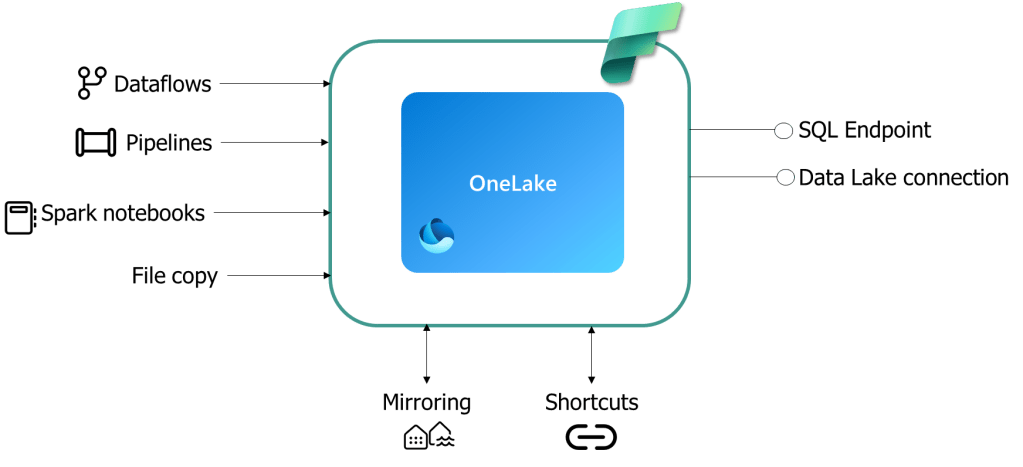
For accessibility outside of Fabric, you can use a SQL endpoint or the underlying ADLS Gen 2 connection that your OneLake is based on.

For internal accessibility inside of Microsoft Fabric you can use a dataflow endpoint, a semantic model connection or an internal shortcut. Or it can just be accessible inside a workspace within one domain where other domains can connect to it an load it using their prefered integration tool within their domain.

Interoperability

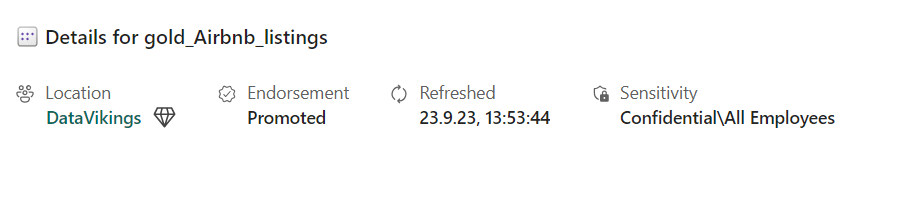
A data product is interoperable through its metadata that also holds some of the standardization of the data product, as the schema and semanitcs. Below is a screenshot from Fabric of a dataset with a location, labelled endorsement, refresh date and sensitivity label.

Trusted

The metadata also enforces some of the governance over the data product with its ownership, and security or rights to use that ensures that our data product is trusted. in addition, the observability of the data products provides us with information about the SLA, timeliness and quality of the data product. This is all part of how we can trust our data product.

In Microsoft Fabric, the refresh log provides us with the observability of the data product. For the SLA and data quality, there is no documentation possibility inside of Microsoft Fabric, unless you buy the data catalog purview as an additional tool that integrates with Microsoft Fabric. Here you can document your data products. Purview could also help ensure that a data product is findable through search as a point further below. Still, as Purview is an external tool that requires an additional licence, this is not further considered in this blog.

Reusability

In Fabric, you can reuse a table, dataflow or dataset as needed to develop other data products. An example is the semantic link from the semantic model that now can be queried inside a notebook in your data lakehouse.

Findable

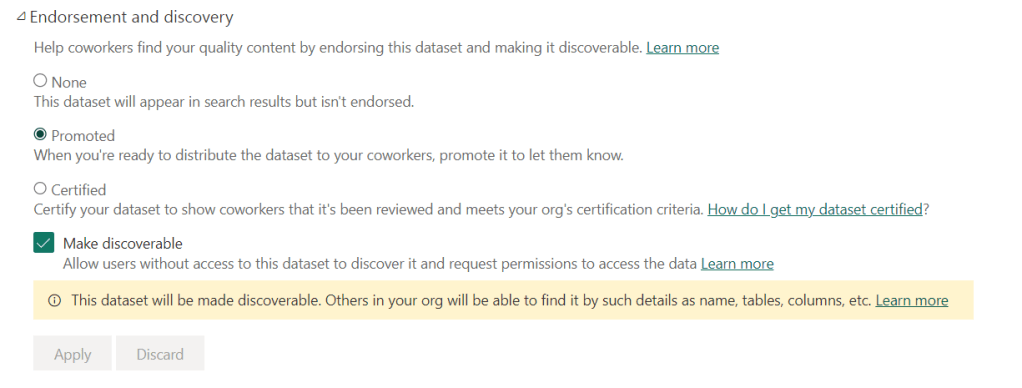
One way to better manage a data product in Microsoft Fabric could be to take advantage of labelling where you can put “Endorsed” and “Certified” on items. For instance, to determine if an item is a data product, you can rely on the labelling in Microsoft Fabric saying “Certified”. However, it’s important to note that this labelling restricts its use to other items in Fabric. Additionally, it is essential to ensure that the label is retained specifically for this purpose.

Limitations

In terms of data products, there are a few features that could enhance the Fabric platform:

  1. Tagging and Categorization: Introducing a capability to tag or categorize data items within Fabric would allow users to easily label their data as a certified Data Product. This would enable efficient organization and retrieval of specific datasets.
  2. Journey Tracking and discoverability: It would be beneficial to have a feature in Fabric that tracks the journey of a data product throughout its lifecycle. This way, users can easily monitor and trace the movement of their data items within the platform.
  3. Documentation and Restrictions: Providing more comprehensive documentation for data products is crucial. Users should have access to clear instructions on how to utilize and connect to the data, as well as any associated restrictions on usage. This information will help users leverage the data effectively and ensure compliance with any contractual obligations.
  4. Data Product Contract Specification: Introducing a data product contract specification feature in Fabric would be advantageous. This would allow users to define contractual terms for their data products. The contract could specify details such as permitted usage, data access restrictions, and any specific requirements for utilizing the data.

By incorporating these features, Fabric could offer a more robust and user-friendly experience for managing data products.

How do you handle your data domains in Microsoft Fabric?

A domain is a grouping of data, technology, teams, and people that work within the same analytical realm, usually within a business area. Examples of domains could be the organizational structure, like Sales, Marketing, Finance, and HR. It can also be more fine-grained or connected to a value chain, like Orders, Production, and Distribution. All of this depends on your organization and how the domains would serve you and your business in the best way. The key thing here is that each domain can be autonomous and have ownership over the data products that naturally belong to their domain.

Since each domain is autonomous, they can develop their data products and govern these as desired. Still, the governance should be aligned with the centralized data governance. I will come back to this. The ETL and data modelling are also handled locally by the domain while taking advantage of the self-service data platform provided through the central organization.

What are Domains in Microsoft Fabric?

To understand how you can set up your governance in Fabric, let us first take a look at the new functionality that was added to Fabric, Domains.

The domains introduced in Fabric are a way to support the data mesh architecture. You can assign the workspaces owned by a business area to one domain. So all your sales-related workspaces could be in your Sales domain, while your marketing-related workspaces could be inside the Marketing domain.

Microsoft Fabric is built from the Power BI developer perspective, and the specialist tools that Microsoft has brought into Fabric as Synapse and ADF are now more available for the generalist. This enables domains to become more independent of technical competence and self-sufficient. This drives the efficiency of each domain.

Limitations

The management of each domain could have been more detailed inside the admin portal of Microsoft Fabric. Today you can only automate what workspaces are places in which domains and who can be the admin of this. It would have been interesting if you could set up policies for each domain and have more possibilities to govern this.

How do you handle your self-serve data platform with Microsoft Fabric?

The next component of the data mesh approach is the self-serve Data Platform. The self-serve data platform is a centralized service that serves the domains with their need for infrastructure, storage, security, access management, ETL pipelines and more. Some call this data infrastructure a platform to highlight that the self-serve platform should serve the infrastructure, i.e. all the technical components and their integrations required to build data products.

This simplicity in distributing Microsoft Fabric as a data platform as a service is one of the biggest strengths. As it is a SaaS it provides you with all the necessary infrastructure and integrations to start building your data products.

By designating a Microsoft Fabric domain for each data mesh domain, organizations effortlessly extend the self-serve capabilities to every corner of their ecosystem. This inclusivity means that every Fabric capacity holder gains unfettered access to the diverse experiences offered by Fabric, empowering them to develop their individualized data products.

How do you set up data governance with data mesh in Microsoft Fabric?

To make each domain autonomous in its data product development and management, a federated governance model is used. The federation of governance is a way of deferring responsibilities to enable scalability. It promotes independence and accountability. This way, the domains can govern their data products in a way that is effective and makes sense to them.

Still, there should be some centralized governance providing a set of standards, and best practices, setting the necessary boundaries, and being a center of excellence, providing expertise to the federated domains.

In this article, I will focus on how data governance fits into the data mesh architecture. For those interested in the specific governance features of Microsoft Fabric, a blog post on setting up data governance within this framework is available.

How do you set up your Data Governance in Microsoft Fabric?

Federated Governance

The Domains enables federated governance in Microsoft Fabric. There is also a new role created with this and that is the domain admin that can delegate responsibilities to contributors.

Through your workspace roles, you manage who can work with what from a technical developer’s perspective. To see the different capabilities that the different roles have, refer to the Microsoft documentation here.

Centralized Governance

Fabric in itself will enable some standardization and enforce some standardisation and controle as there is a finite number of ways to develop your products and make them accessible.

The Purview hub within Microsoft Fabric emerges as a cornerstone for centralized computational governance. This hub offers a level of centralization that enables a comprehensive overview of domains and data products, allowing stakeholders to assess the status of each domain. It serves as a control centre, facilitating both a holistic perspective and the ability to drill down into individual domains for detailed evaluations.

In Microsoft Fabric you can also take advantage of some built-in policies such as the Data Loss Prevention policies and labelling that is further described in the blog linked above.

Limitations

While Microsoft Fabric inherently provides a level of standardization and control due to its finite number of development approaches and accessibility options, there are limitations. Notably, the platform currently lacks the capability to establish standards and patterns for solution development. More possibilities and granular control levels to set up access policies and development policies would be interesting.

Another example where Microsoft Fabric falls short is Master Data Management. There is no integrated solution enabling functionalities such as survivorship and the creation of a golden record, necessitating reliance on external tools.

Summary

In summary, while there are limitations in the Microsoft Fabric setup when implementing a data mesh architecture, I believe that Microsoft Fabric significantly enables some of the most crucial features of data mesh, particularly infrastructure as a service from a central team and the inherent enforcement of central governance through the limited number of methods for the domains to develop their products. While additional levels of control and options to monitor the data product journey would have been desirable, I am currently of the opinion that Microsoft Fabric comes pretty close.

Hope you found this article helpful!

Usefull links:

How do you set up your Data Governance in Microsoft Fabric? — 11. Oct 2023

How do you set up your Data Governance in Microsoft Fabric?


What is Data Governance in Microsoft Fabric?

So, what is data governance in Fabric? The governance domain contains many capabilities. If you follow the DAMA approach, you know that they have divided Data Governance into 10 capabilities, looking into architecture, data warehousing, operations, security, quality, and everything you do with your data from the source to delivered insights.

In Fabric, obviously, everything regarding Data Governance is still important. Despite that, in this article, I will focus on the specific Fabric components and features that help you govern your data in Fabric.

Let’s take a look at the new features Domains in Fabric, how Data Lineage is implemented, Roles and access management, policies and processes, and the purview hub.

I have previously written a blog on what your Power BI governance should contain. As fabric makes up more of your data ecosystem, you will additionally need to focus on other governance capabilities. Still, if you want to look into Power BI-specific governance, you can have a look at that one here:

What are Domains in Fabric?

To understand how you can set up your governance in Fabric, let us first take a look at the new functionality that was added to Fabric, Domains.

Today, the distributed and federated model is becoming more and more popular for organizations. The data mesh architecture is gaining traction, where you decentralize data architecture and have each business domain govern their own data.

The domains introduced in Fabric are a way to support this data mesh architecture. You can assign the workspaces owned by a business area to one domain. So all your sales-related workspaces could be in your Sales domain, while your marketing-related workspaces could be inside the Marketing domain.

Which Roles do we have in Fabric?

In Microsoft Fabric, you can divide your roles into three areas. You have your domain roles, tenant roles, and workspace roles. The Capacity admin and domain admin can delegate some of their responsibilities to contributors.

In the world of data governance, your domain admin could be your data owner or a technical resource working on behalf of the data owner, while the domain contributor could be your data steward. You could also give the domain admin role to your data stewards, depending on the role definitions in your organization.

The capacity admin and capacity contributor, as well as the overall Fabric admin, would normally be assigned to technical roles in your organization.

Through your workspace roles, you manage who can work with what from a technical developer’s perspective. To see the different capabilities that the different roles have, refer to the Microsoft documentation here.

Access Management in Fabric

There are four permision levels in Fabric

  • Workspace Permission
  • Item Permission
  • Compute Permission
  • Row and column level permission

Workspace permission in Fabric

Workspace permission provides access to all the items that are inside a workspace. That means you get access to all datalakes, data warehouses, data pipelines, dataflows, datasets, reports, etc. in the workspace.

In the workspace, there are also two access types you can give:

  • Read-only
  • Read-write

The read-only role is a viewer role that can view the content of the workspace, but not make changes. The role can also query data from SQL or Power BI reports, but not create new items or make changes to items.

Read-write is the Admin, Member, and Contributor role. They can view data directly in OneLake, write data to OneLake, and create and manage items.

Items permission in Fabric

Item permission makes it possible to provide access to one spesific item in the workspace direcly, without granting access to the workspace and all the items in the workspace.

This can be done through two methods:

Give access through Sharing

This feature can be configured to give connect-only permissions, full SQL access, or access to OneLake and Apache Spark.

In the Microsoft documentation page you can read the details on what the different sharing permissions provide access to

Give access through Manage Permissions

Here you can give direct access to items, or manage your already provided accesses.

Compute permission in Fabric

You can also provide access through the SQL endpoint in Fabric.

As an example, if you want to provide viewer-only access to the lakehouse, you can grant the user SELECT through the SQL endpoint.

Or, if you want to provide granular access to specific objects within the Warehouse, share the Warehouse with no additional permissions, then provide granular access to specific objects using T-SQL GRANT statement.

Column-Level & Row-Level Security for Farcic Warehouse & SQL Endpoint in Fabric

On October 3rd, Microsoft announced the public preview of Column-level and Row-level security for the Fabric warehouse and SQL endpoint.

Read the full announcement here: https://blog.fabric.microsoft.com/en-us/blog/announcing-column-level-row-level-security-for-fabric-warehouse-sql-endpoint

Row-level security allows you to control access to specific roles in your table for certain users or groups. This means you don’t have to create separate tables or reports to provide access to only certain parts of your data for specific users. For example, you can give a store manager access to only the sick leave data of their employees.

Column-level security works similarly, but it operates at the column level. This means you can restrict access to specific columns of a table, such as GDPR-related data like a customer’s full name, while allowing more users to access the remaining data in that table.

These ways of providing access can help you simplify management, reduce duplication, and increase the security of your data assets.

Best practices for access in Fabric

Microsoft has provided som general advice in what access type you should use when providing access to workspaces and specific items in Fabric. The following advice was found in the documentation here.

Write access: To have write access, users must be in a workspace role that allows writing. This applies to all data items, so limit workspaces to a single team of data engineers.

Lake access: To allow users to read data in OneLake, add them as Admin, Member, or Contributor, or share the item with ReadAll access.

General data access: Users with Viewer permissions can access data through the SQL endpoint for warehouses, lakehouses, and datasets.

Object level security: To keep sensitive data safe, grant users access to a warehouse or lakehouse SQL endpoint using the Viewer role. Then, use SQL DENY statements to limit access to specific tables.

Processes and Policies in Fabric

Information Protection in Fabric

Information Protection in Microsoft Fabric is based on labeling your data. This way you can set up sensitivity labels on your data in Fabric in order to monitor it and ensure that data is protected, even if it is exported out of Fabric.

These sensitivity labels are set up through the Microsoft Purview portal.

On Microsofts documentation pages you can see what type of labeling is possible, what scenario you should use what, and if it currently is supported in Fabric. See the full documentation here: https://learn.microsoft.com/en-us/fabric/governance/information-protection

Below I have pasted the label overview from that documentation:

Data Loss Prevention in Fabric

You can also set up Data Loss Prevention (DLP) policies in Fabric. So far it is only supported for datasets. You set up these DLP policies inside the Microsoft Purview compliance portal.

When setting this up in the Microsoft Purview portal it looks like the only policy category supported for Power BI/Fabric now is “Custom”.

For the DLP policy you can set up a set of actions that will happen if the policy detects a dataset that contains sensitive data. You can either set up:

  • User Notification
  • Alerts sent by email to aministrators and users

The DLP Policy will run every time a dataset is:

  • Published
  • Repluished
  • Refreshed through an on-remand refreshed
  • Refreshed through a scheduler refresh

When using the DLP feature, it is important to remember that a premium license is required. Additionally, it is worth noting that the DLP evaluation workload utilizes the premium capacity associated with the workspace where the dataset being evaluated is located. The CPU consumption of a of the DLP evaluation is calculated as 30 % of the CPU concumed by the action that triggered the evaluation. If you use a Premium Per User (PPU) license the cost of the DLP is covered up front by the lisence cost.

Endorsement in Fabric

In Fabric you can endorse all items except for the Power BI dashboards. Endorsement is a label you can use on your items to tell your Fabric users that this items hold some level quality.

There are two endorsments you can give an item:

  • Promoted
    • What is it?
      • Users can label items a spormoted if they think the item hold a high standard and could be valuable for others. Somone think the item is ready to use inside the organisation and valuable to share!
    • Who can promote?
      • Content owners and memebers with write permissions to items can promote.
  • Certified
    • What is it?
      • Users can label items as certified if the item meet organizational quality standards, is reliable, authorative and ready to use accross the organixation. Ites with this label holds a higher quality than the promoted ones.
    • Who can certifiy?
      • Fabric administrators can authorize selected users to assign the certified label. Domain administrators can be delegated the eanblement and configuration of specifying reviewers within each domain

Data Activator in Fabric

Microsoft released Data Activator in public preview on October 5th. It’s a tool that helps you automate alerts and actions based on your Fabric data. Using Data Activator, you can avoid the need to constantly monitor operational dashboards manually, helping you govern your data assets in Fabric.

Data activator desereves its own blog post, so I will just mention it here as a component to take advantage of in your Data Governance setup.

Read the full announcement here: https://blog.fabric.microsoft.com/en-us/blog/announcing-the-data-activator-public-preview/

Data Lineage and Metadata in Fabric

Data Lineage and Metadata management is an important enabler for governance. It help you get an overview of your data assets and can also be used to enable obsservability features of your data assets.

Metadata scanning in Fabric

In Fabric you can take advantage of metadata scanning through Admin REST APIs to get information as name of item, owner, senseitivity label, endorsement. Also, for datasets you can get more detailed information about that item as table and column name, DAX expressions and measures. To use this metadata scanning to collect information for your data consumers to look up existing ddata assets, and for the administrators and governance roles to manage the assets is benefitial.

There are four scanner APIs that can be used to catalog your data assets:

Lineage in Fabric

Each workspace in Fabric got a lineage view that can be acceessed by anyone with the Admin, Member or Contributor role for that workspace.

Lineage provdes an overview of how data flows through your items in Fabric, and can be a great way to answer questions as “What is my source for this report?”, “If I change this table, will any other data assets be affected?” and so on.

To view the lienage view for a workspace, click the lineage sign on the top right of the workspae. To see the lineage focused for one specific item, click on the “Show lineage” symbol on the right side of that object. To see the impact analysis, click the “Show impact accross workspace” symbol.

Microsoft Purview Hub in Fabric

In Fabric, administrators have access to Microsoft Purview hub that is a centralized page in Fabric that provide insight on the current state of their data assets.

Inside the Microsoft Purview hub consists of two main components:

  • A portal that will send you to Microsoft Purview. You need to have purchsed Microsoft Purview to take advantage of this.
  • A Microsoft Fabric data report that give you insights on all your Fabric Items. You can open the fill report to view more detailed information in the following report pages:
    • Overviw Report
    • Endorse Report
    • Sensitivity Report
    • Helo
    • Items page
    • Sensitivity page

This report give you insights on how many of your items are labeled with endorsement or sensitivity by item type and workspace. It also provides you with the overview of how your admins or contributors are working with labeling your Fabric items. If your organization have defined data stewards, this would be where you could see the overview of how your data stewards are governing the Fabric items.

Why is Data Governance in Fabric important?

Fabric is a great tool in the way it lowers the barrier of starting to develop new data assets. Also, as it is built from the business user perspective, starting from the Power BI user interface, it also lowers the technical barrier for many Power BI report developers and business analysts to do more with their data assets.

This is a great advantage, but also opens up for some new challenges. Anyone who has been governing BI assets in the past knows the struggle of making sure the reports are developed, managed, and governed in the right way. With Fabric, lowering the technical barrier to do more with your data, and moving further back in your development process, it also becomes easier to do things the wrong way.

Therefore, I think governance in Fabric is more important than ever.

Hope you found this article helpful!

Usefull links:

What is OneLake in Microsoft Fabric? — 4. Oct 2023

What is OneLake in Microsoft Fabric?

OneLake in Fabric is a Data Lake as a Service solution that provides one data lake for your entire organization, and one copy of data that multiple analytical engines can process.

Microsoft Fabric is the new and shiny tool that Microsoft released May 23rd during Build. There are multiple very interesting features and opportunities that follows with Fabric, but as there already exist some great articles that give a nice overview, I want to dig into some of the spesific Fabric components more in details.

So, let’s start with the feature that to me is one of the most game changing ones. A fundamental part of Microsoft Fabric, the OneLake.

Content

  1. Content
  2. What is OneLake in Microsoft Fabric?
  3. How can you use File Explorer with your OneLake in Microsoft Fabric?
  4. File Structure in OneLake
  5. Access and Permissions in OneLake
  6. What are the benefits of OneLake?

What is OneLake in Microsoft Fabric?

First, let’s start with an introduction. In short:

OneLake = OneDrive for data

The OneLake works as a foundation layer for your Microsoft Fabric setup. The idea is that you have one single data lake solution that you can use for your entire organisation. That drives some benefits and reduces complexity:

  • Unified governance
  • Unified storage
  • Unified transformations
  • Unified discovery

Per tenant in Microsoft Farbic you have ONE OneLake that is fully integrated for you. You do not have to provision it or set it up as you would with your previous Data Lakes in Azure.

OneLake is the storage layer to all tour Fabric experiences, but also to other external tools. In addition, you can virtually copy data you have in other storage locations into your OneLake using shortcuts. Shortcuts are objects in OneLake that point to other storage locations. This feature deserves its own blog post, so for now, let’s just summarize what OneLake is with the following:

OneLake in Fabric is a Data Lake as a Service solution that provides one data lake for your entire organization, and one copy of data that multiple analytical engines can process.

How can you use File Explorer with your OneLake in Microsoft Fabric?

So, as OneLake is your One Drive for data, you can now explore your data in your File Explorer. To set this up you need to download the OneLake file explorer application that integrates Microsoft OneLake with the Windows File Explorer. This can be done through this link: https://www.microsoft.com/en-us/download/details.aspx?id=105222

After downloading the application, you log in with the user you are using when logging into Fabric.

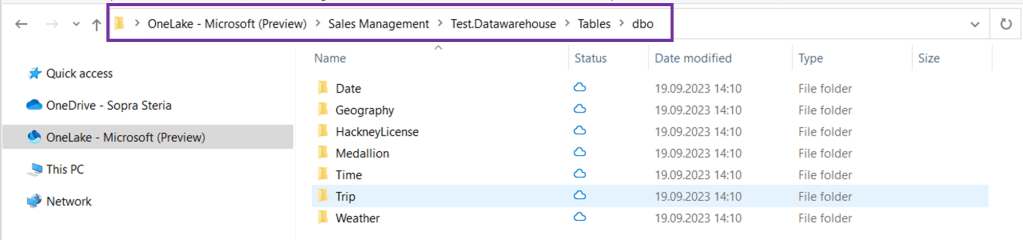
You can now view your workspaces as folders in your File Explorer.

You can then open up the workspaces you want to explore and drill down to specific tables. Below I have opened up my Sales Management workspace, then opened the data warehouse I have created in that workspace and then the tables I have in my data warehouse.

This also means that you can drag and drop data from your File Explorer into your desired Fabric folders – but not for all folders. This works if you want to drag and drop files to your Files folder in your datalake instead of uploading the files directly inside Fabric.

Below, I dragged my winequality-red.csv file from my regular folder to my Files folder inside a DataLake in OneLake.

It will then appear inside the DataLake explorer view in Fabric:

File Structure in OneLake

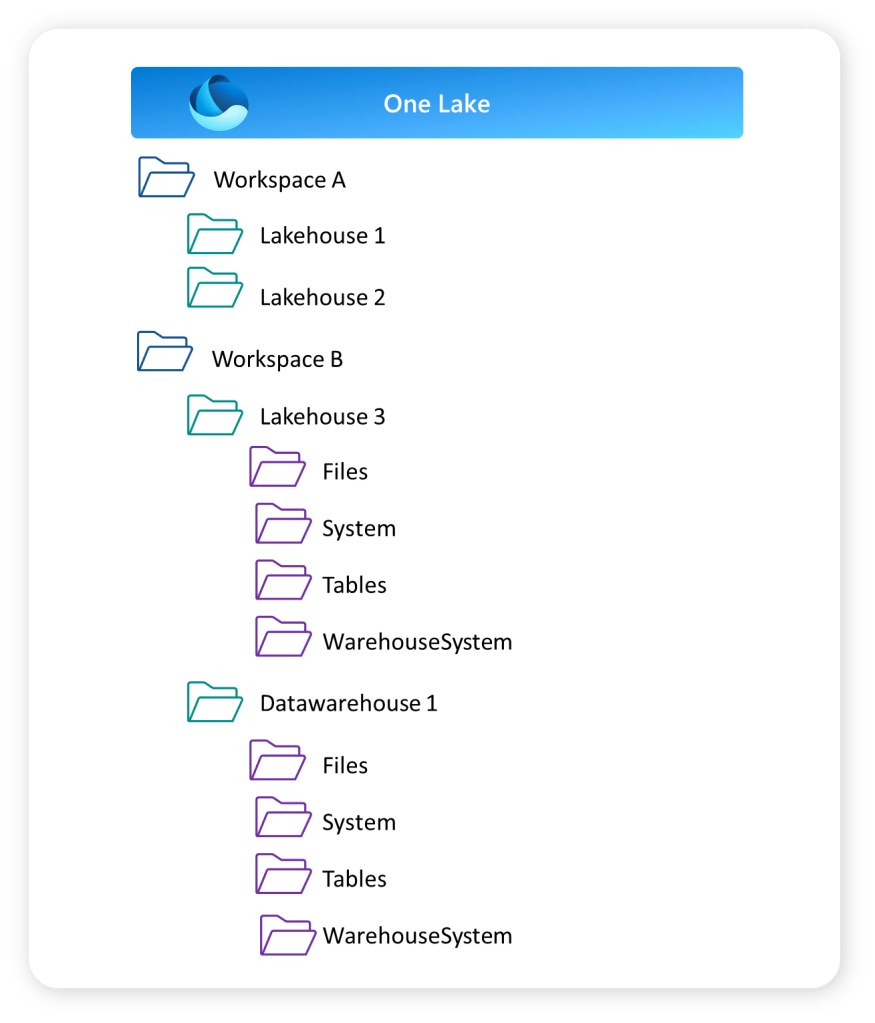
You can structure your data in OneLake using the Workspaces in Fabric. Workspaces will be familiar to anyone who has been using Power BI Service.

The Workspaces creates the top folder structure in your OneLake. These work as both storage areas and a collaborative environment where data engineers, data analysts and business users can work together on data assets within their domain.

The lakehouse and data warehouse that you might have created in your workspace will create the next level in your folder structure as shown below. This shows the Folder View of your workspaces.

Access and Permissions in OneLake

How do you grant access to the OneLake?

Inside a workspace there are two access types you can give:

  • Read-only
  • Read-write

The read-only role is a viewer role that can view the content of the workspace, but not make changes. The role can also query data from SQL or Power BI reports, but not create new items or make changes to items.

Read-write is the Admin, Member and Contributor role. They can view data directly in OneLake, write data to OneLake and create and manage items.

To grant users direct read access to data in OneLake, you have a few options:

  1. Assign them one of the following workspace roles:

    • Admin: This role provides users with full control over the workspace, including read access to all data within it.
    • Member: Members can view and interact with the data in the workspace but do not have administrative privileges.
    • Contributor: Contributors can access and contribute to the data in the workspace, but they have limited control over workspace settings.
  2. Share the specific item(s) in OneLake with the users, granting them ReadAll access. This allows them to read the content of the shared item without providing them with broader access to the entire workspace.

By utilizing these methods, you can ensure that users have the necessary read access to the desired data in OneLake.

What are the benefits of OneLake?

So to conclude, let’s try and summarise some of the benefits you get with OneLake in Fabric.

  • OneLake = One version of your data
    • No need to copy data to use it with another tool or to analyze it alongside other data sources. The shortcuts and DirectLake features are important enablers for this. These features deserve a separate blog.
  • Datalake as a Service
    • For each tenant you have a fully integrated OneLake. No need to spend time provisioning or handling infrastructure. It works as a Datalake as a Service.
  • Multiple Lakehouses
    • OneLake allows for the creation of multiple lakehouses within one workspace or across different workspaces. Each lakehouse has its own data and access control, providing security benefits.
  • Supports Delta Format
    • The OneLake supports the delta file format, which optimizes data storage for data engineering workflows. It offers efficient storage, versioning, schema enforcement, ACID transactions, and streaming support. It is well-integrated with Apache Spark, making it suitable for large-scale data processing applications.
  • Flexible Storage Format
    • You can store any type of file, structured or unstructured. That means that data scientists can work with raw data formats, while data analysts can work with structured data inside the same OneLake.
  • OneLake Explorer
    • Easy access to your OneLake with the OneLake Explorer to get a quick overview of your data assets, or upload files to your lakehouse.
  • Familiar UI
    • For any Power BI developer, the touch and feel of Fabric will be familiar.

Hope you found this blog useful! Let me know if you have started using OneLake!

Usefull links:

What are Dataflows Gen 2 in Fabric? — 16. Jun 2023

What are Dataflows Gen 2 in Fabric?

I have previously written a post on Power BI Dataflows explaining what it is, how you can set it up when you should use it, and why you should use it. I am a big fan of the Gen 1 Power BI Dataflows. So now, with the new introduction of Dataflows Gen 2 in Fabric, I had to take a deeper look.

In this article, we will look at the new features that separate Dataflows Gen 2 from Dataflows Gen 1. Then we’ll have a look at how you can set it up inside Fabric before I try to answer the when and why to use it. What new possibilities do we have with dataflows Gen 2?

After digging into the new dataflows Gen 2, there are still unanswered questions. Hopefully, in the weeks to come, new documentation and viewpoints will be available to answer some of these.

To learn the basics of a dataflow you can have a look at my previous article regarding dataflows gen 1.

  1. What are Dataflows Gen 2 in Fabric?
  2. What is the difference between Dataflows Gen 1 and Gen2 in Fabric?
    1. Output destination
    2. Integration with datapipeline
    3. Improved monitoring and refresh history
    4. Auto-save and background publishing
    5. High-scale compute
  3. How can you set up Dataflows Gen 2 in Fabric?
  4. When should you use Dataflows Gen 2 in Fabric?
    1. Limitations
  5. Why should you use Dataflows Gen 2?

What are Dataflows Gen 2 in Fabric?

To start, Dataflows Gen 2 in Fabric is a development from the original Power BI Dataflows Gen 1. It is still Power Query Online that provides a self-service data integration tool.

As previously, you can create reusable transformation logic and build tables that multiple reports can take advantage of.

What is the difference between Dataflows Gen 1 and Gen2 in Fabric?

So, what is new with Dataflows Gen 2 in Fabric?

There are a set of differences and new features listed in the Microsoft documentation here. They provide the following table.

FeatureDataflow Gen2Dataflow Gen1
Author dataflows with Power Query
Shorter authoring flow
Auto-Save and background publishing
Output destinations
Improved monitoring and refresh history
Integration with data pipelines
High-scale compute
Get Data via Dataflows connector
Direct Query via Dataflows connector
Incremental refresh
AI Insights support

But what is different, and what does that mean? I would say the features output destination and integration with data pipelines are the most existing changes and improvements from Gen 1. Let’s have a look.

Output destination

You can now set an output destination for your tables inside your dataflow. That is, for each table, you can decide if by running that dataflow, the data should be loaded into a new destination. Previously, the only destination for a dataflow would be a power bi report or another dataflow.

The current output destinations available are:

  • Azure SQL database
  • Lakehouse
  • Azure Data Explorer
  • Azure Synapse Analytics

And Microsoft says “many more are coming soon”.

Integration with datapipeline

Another big change is that you can now use your dataflow as an activity in a datapipeline.  This can be useful when you need to perform additional operations on the transformed data, and also opens up for reusability of transformation logic you have set up in a dataflow.


Improved monitoring and refresh history

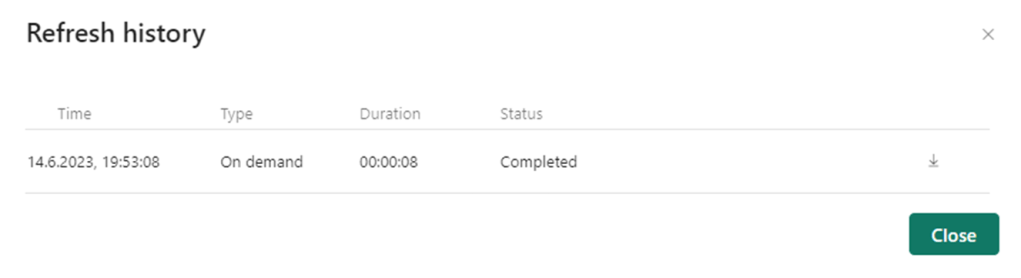
In Gen 1 the refresh history is quite plain and basic as seen from the screenshot below.

In Gen 2, there have been some upgrades on the visual representations, as well as the level of detail you can look into.

Now you can easier see what refreshes succeeded and which ones failed with the green and red icons.

In addition, you can go one step deeper and look at each refresh separately. Here you get details on request ID, Session ID and Dataflow ID as well as seeing for the separate tables if they succeeded or not. This makes debugging easier.

Auto-save and background publishing

Now, Fabric will autosave your dataflow. This is a nice feature if you for whatever reason suddenly close your dataflow. The new dataflow will be saved with a generic name “Dataflow x” that you can later change.

High-scale compute

I have not found much documentation on this, but in short dataflow Gen 2 also got an enhanced compute engine to improve performance similar to Gen 1. Dataflow Gen 2 will create both Lakehouse and Warehouse items in your workspace and uses these to store and access data to improve performance for your dataflows.

How can you set up Dataflows Gen 2 in Fabric?

You can create a Dataflow Gen2 inside Data Factory inside of Fabric. Either through the workspace and “New”, or the start page for Data Factory in Fabric.

Here you can choose what source you want to get data from, if you want to build on an existing data flow, or if you want to import a Power Query Template.

If you have existing dataflows you want to use, you can choose to export them as a template and upload it as a starting point for your dataflow.

When should you use Dataflows Gen 2 in Fabric?

In general, the dataflows gen 2 can be used for the same purpose as dataflows Gen 1. But what is special about Dataflows Gen 2?

The new data destination feature combined with the integration to datapipeline provide some new opportunities:

  •  You can use the dataflow to extract the data and then transform the data. After that, you now have two options:
    • The dataflow can be used as a curated dataset for data analysts to develop reports.
    •  You can choose a destination for your transformed tables for consumption from that destination.
  •  You can use your dataflow as a step in your datapipeline. Here there are multiple options, but one could be
    • Use a dataflow to both extract and transform/clean your data. Then, invoked by your datapipeline, use your preferred coding language for more advanced modelling and to build business logic.

The same use cases that we had for dataflows Gen 1 also apply to dataflows Gen 2:

Dataflows are particularly great if you are dealing with tables that you know will be reused a lot in your organization, e.g. dimension tables, master data tables or reference tables.

If you want to take advantage of Azure Machine Learning and Azure Cognitive Services in Power BI this is available to you through Power BI Dataflows. Power BI Dataflows integrates with these services and offers an easy self-service drag-and-drop solution for non-technical users. You do not need an Azure subscription to use this but requires a Premium license. Read more about ML and Cognitive Services in Power BI Dataflows here.

In addition, Power BI Dataflows provides the possibility to incrementally refresh your data based on parameters to specify a date range. This is great if you are working with large datasets that are consuming all your memory – but you need a premium license to use this feature.

Limitations

But, there are also some limitations with dataflows Gen 2 stated by Microsoft:

  •  Not a replacement for a data warehouse.
  •  Row-level security isn’t supported.
  •  Fabric capacity workspace is required.

Why should you use Dataflows Gen 2?

As for the Gen 1 dataflows, Gen 2 can help us solve a range of challenges with self-service BI.

  • Improved access control
  • One source of truth for business logic and definitions
  • Provides a tool for standardization on the ETL process
  • Enables self-service BI for non-technical users
  • Enables reusability

But there are still some unanswered questions

Even though the new additions to Dataflows Gen 2 are exciting, there’s still some questions that remain unanswered.

As I read more documentation and get more time to play around with the tool, I hope to be able to update this article with answers.

  • What about version control? If you edit a dataflow as a transformation activity in your data pipeline it is important to be able to back track changes and be able to roll back to previous versions. How would that work?
  • What are the best practices? Is it best to use Power BI dataflows as the main ETL tool now, or should we use pipelines. Should dataflows be mainly used for simple transformations as cleansing, or should we perform as much transformation and logic development as possible?
    • To mainly use dataflows for simple clean up transformations and then use a notebook in a pipeline for more advanced transformations would be my first guess. But then the question on what provides best performance come up.

So, to conclude, the new dataflow Gen 2 features are awesome. It opens up some very exciting new opportunities for your ETL process. The question now is when those opportunities are something you should take advantage of, and when you should not.

Power BI Pro or Power BI Premium – what license should you choose? — 15. Feb 2023

Power BI Pro or Power BI Premium – what license should you choose?

So, what should you choose when looking at the different licences in Power BI? Do you really need to pay for Premium? Or is Premium in fact cheaper for your organization? What features could you take advantage of for the different licenses? And what considerations should you take when evaluating this?

Let’s have a look!

  1. What Power BI licenses are available?
    1. Free
    2. Power BI Pro
    3. Power BI Premium per User
    4. Power BI Premium per Capacity
  2. What should you consider when deciding on a Power BI license?
    1. What flexibility do we need when it comes to changing the licence in the future?
    2. Do you have any technical deal-breaker requirements?
  3. So, what should you choose?

What Power BI licenses are available?

There are four Power BI licenses to choose from. Free, Pro, Premium per Capacity (PPC) or Premium Per User (PPU).

Ordinary Workspace/AppWorkspace/App PPUWorkspace/App PPC
Free licenseNot able to accessNot able to accessGot access
Pro licenseGot accessNot able to accessGot access
PPU licenceGot accessGot accessGot access
Premium per Capacity vs Premium per User

Free

Without a license (or with the free license), you can still take advantage of Power BI Desktop. Still, you cannot share your content with others. The free license is a great place to start learning Power BI if you are curious, but not in a position to purchase a license.

If you are a report consumer and the content you want to consume is placed in a workspace connected to a Premium per Capacity, you do not need any other license than the free one.

Power BI Pro

With a Pro license, you get full developer functionality (with some exceptions that are listed in the next chapter). You can share your content with others.

If you are a report consumer, and you want to consume reports that are inside a workspace that is NOT linked to a premium per capacity license, you also need a Pro license to consume that content.

Power BI Premium per User

With a Premium per User (PPU) license you get full functionality as a developer. Essentially, you get all the Premium features on a per-user basis. You do not need an additional Pro license if you have a PPU license, as all Pro license capabilities are included.

However, if you are a report consumer you also need a Premium Per User license to be able to consume the content within a workspace that is linked to a Premium Per User license.

Power BI Premium per Capacity

With a Premium per Capacity (PPC) license you get full premium functionality. Still, as a report developer, you need a Pro or PPU license to share your reports.

If you are a report consumer, you only need the Free license to consume content that is linked to a Premium per Capacity license.

What do you get with the different licenses?

So, what are the differences between the Pro, Premium per User and Premium per Capacity licenses?

Microsoft got a great overview page where you can compare the licenses and their features HERE.

Below I have listed the differences that in my experience are the most important when considering what license to choose.

PROPremium (Per user)
$ 9.99 monthly price per user$ 4.995 monthly price per dedicated cloud computing and storage resource with an annual subscription.
($ 20 per month per user)
1 GB model size limit.
Your .pbix file cannot be larger than 1 GB
400 GB model size limit
(100 GB model size limit)
8 daily refreshes on dataset in Power BI Service48 daily refreshes on dataset in Power BI Service
Deployment Pipelines available (Application lifecycle management)
Read more on deployment pipelines in my article
Dataflows (minus the dataflow premium features)Dataflows premium features:
– The enhanced compute engine (running on Power BI Premium capacity / parallel execution of transforms)
– DirectQuery connection to dataflow
– AI capabilities in Power BI
– Linked entities
– Computed entities (in-storage transformations using M)
– Incremental refresh
Read more on dataflows in my article
Datamarts available
Read more on datamarts in my article
Embed Power BI visuals into apps
Advanced AI (text analytics, image detection, automated machine learning)
XMLA endpoint read/write connectivity
Configure Multi-Geo support (Only PPC)

What should you consider when deciding on a Power BI license?

Choosing what license fits best for your organization is not easy, and depends on individual requirements. Still, let’s see if there are any questions and considerations you could take into account when trying to decide what license you need.

What flexibility do we need when it comes to changing the licence in the future?

Deciding between the licences can for sure be a difficult decision. The great thing is that you do not have to choose and stick to that solution forever. Many start out with a Pro license, and then as the Power BI usage and adoption within the organization grows, they move over to Premium.

It is however a bit harder to move back to a Pro license if you have started developing reports and datasets that exceed the size limit or have started to take advantage of deployment pipelines, datamarts or premium features in dataflows.
Another important aspect is that you commit to the Premium per Capacity for a year, even though it is billed monthly. This also makes it difficult to move back to Pro.

Still, if you have started taking advantage of these premium features, you probably see the value of keeping the premium capacity.

How many report consumers do you have?

Price wise there is a sweet spot to evaluate here. When you have a premium capacity, you connect your workspaces to that premium capacity. That means that all the reports you publish to an app from that workspace are visible to anyone. They do not need their own pro licence to be able to consume the reports you put in these premium workspaces/apps.

So, some quick math gives us a number of report consumers where the premium feature pays off.

500 report consumers. If you know that you have that many report consumers today or expect to reach that number soon as your company grows and the adoption of Power BI increases, the Premium per Capacity license is a good choice.

Are you using Power BI on an enterprise level?

Or how large is Power BI in your organization? Are there multiple workspaces, apps, reports, data domains and business areas?

How complex is your report development process? Are your report development teams organized in different business domains, but still collaborate on content?

Do you see the need to take advantage of Deployment pipelines to improve the lifecycle management of your content, or do you want to implement source control using an XMLA endpoint?

If you are considering starting with Power BI and know that your setup requires some level of complexity, these premium features can really help you out with large enterprise deployments and workloads.

How large are your reports?

First of all – try and reduce the size of your report. Microsoft got an article listing the techniques you could consider:

Now, if you are not able to reduce the size of your reports below 1 GB, or that does not make any sense to you, the Premium per Capacity or Premium per User license sounds like a solution for you.

Do you have any technical deal-breaker requirements?

When evaluating this question you should collect the technical requirements for your organization. Based on that list, you might see some deal-breakers when it comes to choosing the Pro license.

For instance, you might need an SQL endpoint for your datamarts, or an XMLA endpoint to automate deployment that requires premium features.

You might have some data residency requirements that can only be achieved through a Premium Per Capacity license.

You will be working with datasets that are above 1 GB.

Or you want to take advantage of an incremental refresh for real-time data using DirectQuery. This is only supported for premium licenses.

Getting an overview of these requirements, and evaluating if they require Premium features is a good starting point.

Do you need some of that additional premium features, but the premium per capacity is too much?

After having evaluated all of these questions above, you might still be in need of some of the premium features but are not in a position to choose Premium per Capacity as that might be too expensive. Then Premium per User could be the solution for you if you:

  • Want some of your Power BI Developers to learn or investigate the premium features?
  • Take advantage of the advanced AI features?
  • Want to take advantage of the Deployment Pipelines to improve the lifecycle management of your content?
  • Are working with large datasets that you cannot reduce the size of?
  • Want to set up a solution for source control taking advantage of the XMLA endpoint? Read my article on source control and your options HERE.
  • Want to centralize your BI solution in Power BI Service by building re-usable dataflows and datamarts, and reducing some of the development load on your data warehouse?
  • Do not have a proper data warehouse solution in your organization and want to take advantage of the datamart feature in Power BI Service?

Still, remember: If you go with a PPU license, all consumers of that conent also need a PPU license.

So, what should you choose?

The considerations listed above are probably not covering everything you need to consider if you are in a position where you need to decide between licenses, I am sure.

Still, they might give you a starting point in your evaluation.

The decision each organization falls on depends on the requirement that exists within the individual organization.

Let’s try to sum up some key take aways:

  • If you do not see the need for the premium features to start with –> Consider starting with Pro licenses
  • If you have more than 500 report consumers –> Consider Premium Per Capacity
  • If you are a smaller organization, but still need the premium features –> Consider Premium Per User
  • If you are using Power BI in a large organization across business areas, with numerous reports and datasets and development teams –> Consider Premium Per Capacity
  • Have a look at your technical requirements. –> Some of the limitations with the Pro licenses might make a premium choice obvious for your organization.

One thing that’s also worth mentioning is that Power BI for sure focus its investment on Power BI Premium. The value provided by Power BI Premium will therefore probably increase over time.

So, what license should you choose?
The short answer: It depends.

Useful links:

Thank you to all that contribute to improve this article!

When should you use Power BI Dataflows vs Power BI Datamarts? — 13. Dec 2022

When should you use Power BI Dataflows vs Power BI Datamarts?


I have previously written articles on the What, How, When and Why of Power BI Datamarts and Power BI Dataflows. Have a look below if you want to get a quick overview of the two features of Power BI Service.

But when should you use what?

Power BI Dataflows vs Power BI Datamarts

Let’s revisit the When of both Power BI Dataflows and Power BI Datamarts!
Use casePower BI DataflowPower BI Datamart


Tables that are reused throughout your organization
Dataflows are particularly great if you are dealing with tables that you know will be reused in your organization, e.g. dimension tables, master data tables or reference tables.You can also reuse a datamart, but it is unnecessary to build a datamart to solve this use case.


Azure Machine Learning and Azure Cognitive Services
If you want to take advantage of Azure Machine Learning and Azure Cognitive Services in Power BI this is available to you through Power BI Dataflows. Power BI Dataflows integrates with these services and offers an easy self-service drag-and-drop solution for non-technical users. You do not need an Azure subscription to use this but it requires a Premium license. Read more about ML and Cognitive Services in Power BI Dataflows here.When looking through Power BI Datamarts today I cannot see this functionality easily available. Dataflows was however designed to solve this use case and is, in my opinion, a good place to start.


Incremental refresh
Power BI Dataflows provides the possibility to incrementally refresh your data based on parameters to specify a date range. This is great if you are working with large datasets that are consuming all your memory. However, you need a premium licence to use this feature.It is also possible to set up incremental refreshes for your separate tables in your Datamart. If you have a couple of large tables within your datamart, this could be a nice feature to take advantage of.


Ad-hoc SQL querying and data exploration
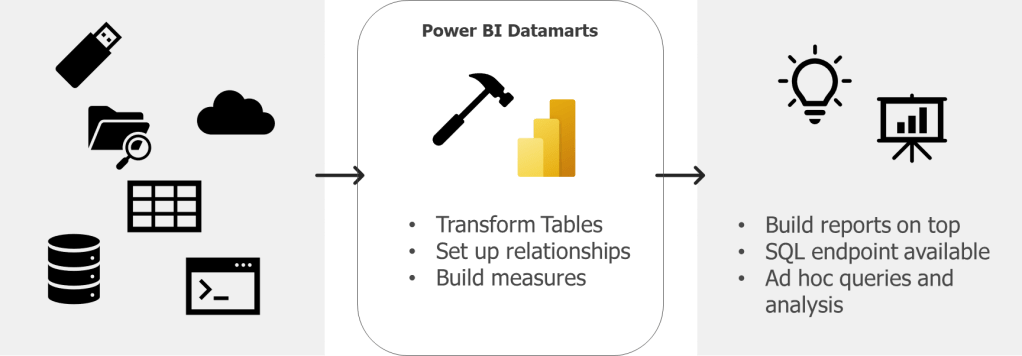
You can explore your data through a dataflow, but it is not possible to run SQL queries with dataflows.Datamarts are particularly great if you want to do ad-hoc querying or data exploration of your data as sort, filter, and do simple aggregation visually or through expressions defined in SQL
This image has an empty alt attribute; its file name is image-17.png

Self Service Data modelling
Dataflows do not support setting up relationships between tables, building measures or writing DAX. A great thing with Power BI Datamarts is that you can model your star schema right in Power BI Service. That way you do not have to wait for the data warehouse to make smaller (or larger) improvements or changes to your data model as you can do these changes yourself – but remember that permanent transformations should be moved as close to the source as possible. This also enables Mac users to do some modelling in Power BI Service.


Need to connect to your data in Power BI Service through a SQL endpoint.
Not possible with dataflows.Power BI datamarts provide a SQL end-point to your data. This is great if that is a requirement from developers or data analysts. You can then use database tools as SSMS to connect to your datamart as any other DB, and run queries.

Let me know what you think and if you have other use cases where the tools should be compared.

Useful links:

What, How, When and Why on Power BI Deployment Pipelines [Hill Sprint] — 7. Dec 2022

What, How, When and Why on Power BI Deployment Pipelines [Hill Sprint]

The What, How, When and Why on Power BI Deployment Pipelines!

  1. What are Power BI Deployment Pipelines?
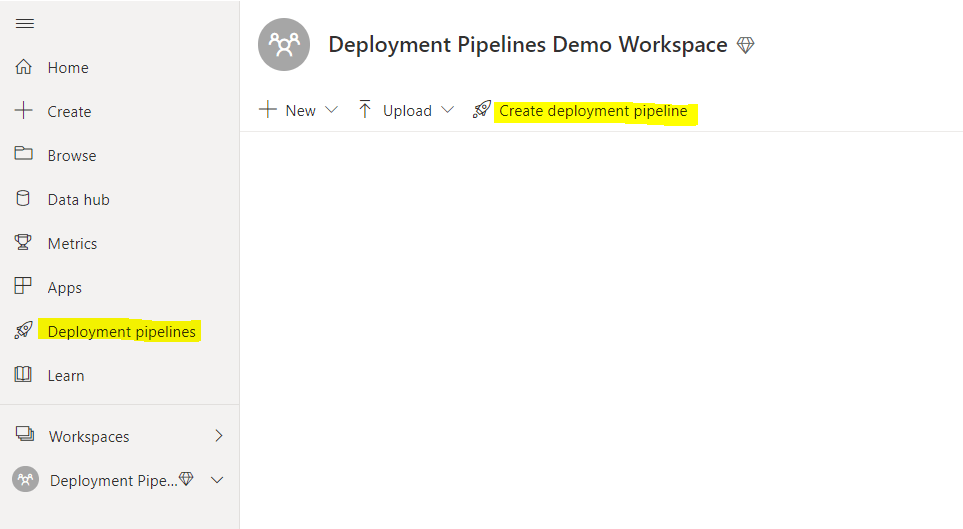
  2. How can you set up Power BI Deployment Pipelines?
  3. When should you use Power BI Deployment Pipelines?
  4. Why should you use Power BI Deployment Pipelines?

What are Power BI Deployment Pipelines?

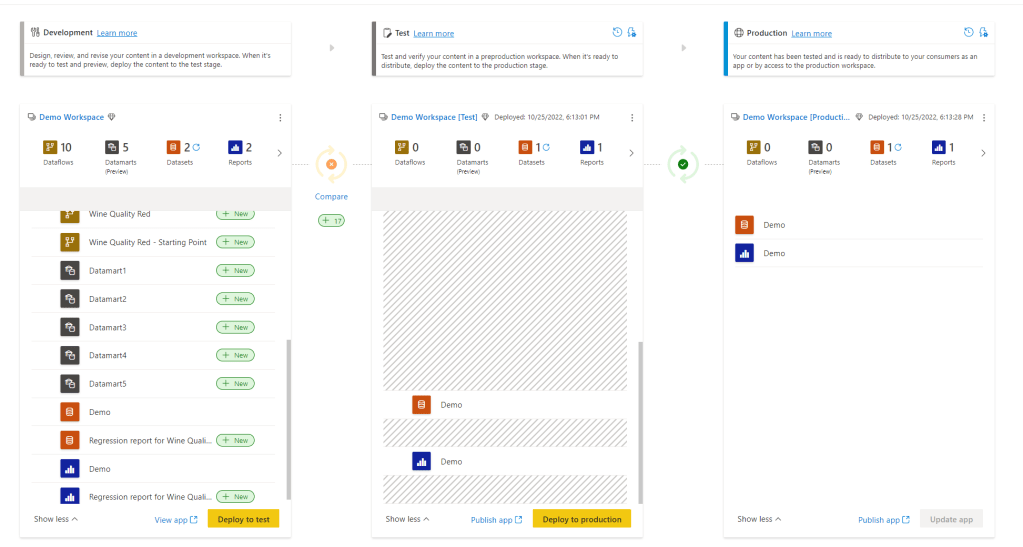
Power BI Deployment pipelines makes it possible for creators to develop and test Power BI content in the Power BI service, before the content is consumed by users. It provides a lifecycle management solution for your Power BI content!

Deployment Pipelines creates a development, test and production workspace for you where you can view the differences between the environments. You can also set up deployment rules that change your data source when deploying from one environment to the next. Like changing from test data in the test workspace to production data in the production workspace.

You can also review your deployment history to monitor the health of your pipeline and troubleshoot problems.

Hence, Deployment Pipelines can help you collaborate with other developers, manage access to testers and automate data source connections.

If you want to learn more on Power BI Deployment Pipelines, you can read the documentation from Microsoft here.

What Deployment Pipelines do NOT help you with is version control. This brings us on to another existing topic that I have not yet created a blog post on – Azure DevOps and Power BI. However, my friend Marc has. You can read his post on how you can utilize Azure DevOps to manage version control on your Power BI Reports here.

How can you set up Power BI Deployment Pipelines?

You set up a Power BI Deployment Pipelines in Power BI Service. This is done through the menu on your left side when login into Power BI Service OR directly in the workspace you want to assign to a Deployment Pipeline.

You then follow these steps:

  1. Click “Create a pipeline”

2. Fill in the name of the pipeline. This needs to be unique for your organization. Make sure the name makes sense for other developers and fill in a description as well.

3. Assign a workspace (if you did not create the pipeline directly from the workspace)
If you created the deployment pipeline directly from the workspace you need to decide if you want to assign the existing workspace to Development, Test or Production. Essentially you are deciding if the existing workspace already is a production environment or a development environment (it could also be a test environment, but dev and prod would probably make the most sense for most).

In the following example, the Development environment was chosen as the starting point/the workspace was assigned to Development.

4. Choosing “Deploy to test” will automatically generate a test workspace for you. Inside this workspace, you can then decide to create an app that can be used to view the content for business testers if you don’t want to give access to the workspace.

5. Choosing “Deploy to production” will automatically generate a production workspace for you. This will be where you provide access to the reports and datasets, datamarts and dataflow to your business analysts that want to take advantage of these assets, and where you create your app to provide access for report consumers.

6. You can change the name of the workspaces by clicking on the ellipse and choosing “Workspace settings”

7. By selecting the lightning bolt above the Test or Production environment you open up “Deployment Settings”.

Depending on the data source you can define deployment rules for your data source. For instance, you can change the file path, database or parameter when deploying from test to production changing the data from test data to production data. Nice!

8. Create apps on top of the development, test and production workspace as needed and assign access to relevant users.

You need premium capacity to get access to Power BI Deployment pipelines.

When should you use Power BI Deployment Pipelines?

When there is a need to provide business users with a test environment to test reports, test the layout of the app or new functionality without mixing with reports that already are in production. Additionally, when there is a need to provide more technical testers with access to a workspace with only content that is ready for testing.

When there are multiple report developers and business domains and there is a need for collaboration and exploration. The development workspace provides an area where multiple Power BI developers can make changes and adjustments to the same files (as long as these changes are made in Power BI Service).

When there is a need to separate test data from production data, where reports should not connect to production data unless the report itself is ready for production.

Why should you use Power BI Deployment Pipelines?

Power BI Deployment Pipelines help us with the lifecycle management of Power BI content

  • Provides a tool to improve and automate the management of the lifecycle of Power BI content
  • Provide a visual overview of developer content and the gap between development, testing and production.
  • Improved access control as you can provide data analysts with access to test apps, and super users to test workspaces instead of being forced to send the reports to your production workspace/app. You also ensure that production data is not made available unless the content is ready for production.
  • Provides collaboration environment for developers
  • Automates source connections when deploying

Useful links:

What are Hill Sprints?

I am having a series called hill sprints (since we are climbing mountains – hehe) that will provide a to the point introduction on a topic covering the What, How, When and Why.

Why hill sprints?

Hill sprints are essentially a form of interval training – probably one of the more intense (but engaging) options. They are quick, brutal and to the point. Let me know if you have another fun analogy towards climbing mountains that would make sense for a series name! (Having way to much fun with this)

First Hill Sprint Series will be on Power BI Service. In this series we will go through some of the main components in Power BI Service, explaining what is it, how can you set it up, when should you use it, and why should you use it.

Hopefully, this can provide some quick insights and knowledge on the components and help decide if this is the tool for you with your current setup or challenge.

What, How, When and Why on Power BI Datamarts [Hill Sprint] — 8. Nov 2022

What, How, When and Why on Power BI Datamarts [Hill Sprint]

The What, How, When and Why on Power BI Datamarts!

  1. What are Power BI Datamarts
  2. How can you set up Power BI Datamarts?
  3. When should you use Power BI Datamarts?
  4. Why should you use Power BI Datamarts?

What are Power BI Datamarts

Power BI Datamarts are a self-service analytics solution that provide a fully managed database that enables you to store and explore your data in a relational and fully managed Azure SQL DB.

That means that you can connect your sources, transform these, set up relationships between the tables and build measures – resulting in a data model in Azure SQL database that you can connect to as any other database.

Datamarts are not a new thing though. A datamart in the world of a data warehouse is the access layer containing a focused version of the data warehouse for a specific department that enables analytics and insights to the business. A datamart could be a star schema designed to provide specific KPIs.

Hence, in Power BI Datamarts we can now build this access layer for specific business domains in Power BI Service as a star schema with relationships and measures.

If you want to learn more on Power BI Datamarts, you can read the documentation from Microsoft here.

How can you set up Power BI Datamarts?

You set up a Power BI Datamarts in Power BI Service. This is done through the workspace you want to hold the datamarts and by clicking “New”.

You then do the following:

  1. Choose source type and connect to your source
  2. Load the data source and transform this (if you want to) in Power Query
  3. Then the data source is loaded into a datamart. You can now do the following based on what you want and need to do to your data:
    • Set up relationships
    • Build measures
    • Run queries with SQL
    • Run queries using low-code functionality

You need premium capacity or premium per user to get access to Datamarts.

When should you use Power BI Datamarts?

Datamarts are particularly great if you want to do ad-hoc querying or data exploration of your data as sort, filter, and do simple aggregation visually or through expressions defined in SQL

A great thing with Power BI Datamarts is that you can model your star schema right in Power BI Service. That way you do not have to wait for the data warehouse to make smaller (or larger) improvements or changes to your datamodel as you can do these changes yourself. If these changes should be permanent or a in between solution while one wait for the datawarehouse depends on the governance that is set up.

In addition, Power BI datamarts provide a SQL end point to your data. This is great if that is a requirement from developers or data analysts. You can then use database tools as SSMS to connect to your datamart as any other DB, and run queries.

Why should you use Power BI Datamarts?

Power BI Datamartscan help us solve a range of challenges with self-service BI. Many of these are similar gains as one could get from Power BI Dataflows.

  • Improved access control as you can provide data analysts with access to the datamart instead of direct access to the data source
  • One source of truth for business logic and definitions
  • Provides a tool for standardization on the ETL process
  • Enables self-service BI for non-technical users
  • Enables reusability

Specific worth from datamarts (compared to Power BI dataflows) are:

  • Self-service solution for quering and explore data for data analysts, as well as for non-technical users as you can query the datamart using low-code functionality
  • Reduce time to production if the alternative is to wait for the needed changes or development to be delivered through the data warehouse. Also, Datamarts developers do not need code experience, and can ingest, transform and prepare the models using existing knowledge from Power Query and Power BI Desktop.
  • Power BI Datamarts support row-level-security (where Power BI Dataflows do not)

Useful links:

What are Hill Sprints?

I am having a series called hill sprints (since we are climbing mountains – hehe) that will provide a to the point introduction on a topic covering the What, How, When and Why.

Why hill sprints?

Hill sprints are essentially a form of interval training – probably one of the more intense (but engaging) options. They are quick, brutal and to the point. Let me know if you have another fun analogy towards climbing mountains that would make sense for a series name! (Having way to much fun with this)

First Hill Sprint Series will be on Power BI Service. In this series we will go through some of the main components in Power BI Service, explaining what is it, how can you set it up, when should you use it, and why should you use it.

Hopefully, this can provide some quick insights and knowledge on the components and help decide if this is the tool for you with your current setup or challenge.